Transoffset
这说明了使用transforms.offset_copy进行变换,该变换将绘图元素(如文本字符串)定位在屏幕坐标(点或英寸)中相对于任何坐标中给出的位置的指定偏移处。
每个Artist - 从中派生Text和Line等类的mpl类 - 都有一个可以在创建Artist时设置的转换,例如通过相应的pyplot命令。 默认情况下,这通常是Axes.transData转换,从数据单元到屏幕点。 我们可以使用offset_copy函数来修改此转换的副本,其中修改包含偏移量。
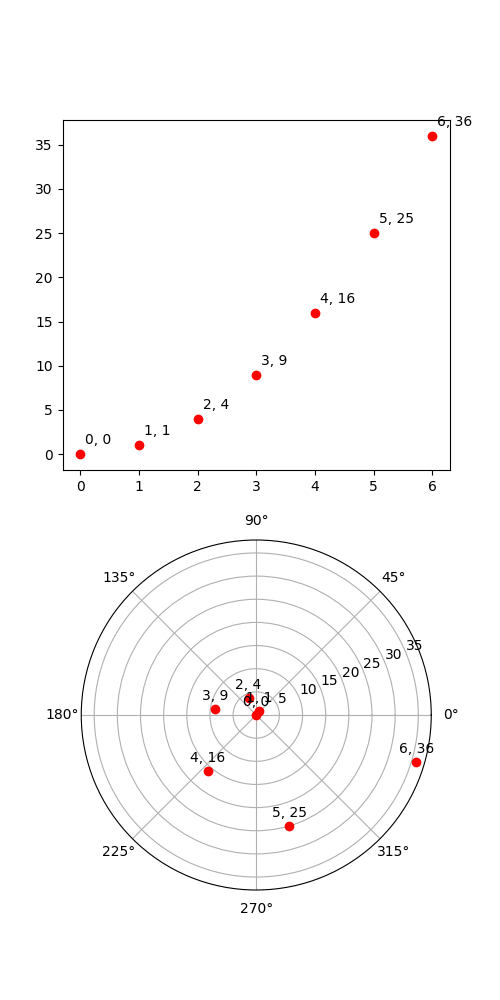
import matplotlib.pyplot as pltimport matplotlib.transforms as mtransformsimport numpy as npxs = np.arange(7)ys = xs**2fig = plt.figure(figsize=(5, 10))ax = plt.subplot(2, 1, 1)# If we want the same offset for each text instance,# we only need to make one transform. To get the# transform argument to offset_copy, we need to make the axes# first; the subplot command above is one way to do this.trans_offset = mtransforms.offset_copy(ax.transData, fig=fig,x=0.05, y=0.10, units='inches')for x, y in zip(xs, ys):plt.plot((x,), (y,), 'ro')plt.text(x, y, '%d, %d' % (int(x), int(y)), transform=trans_offset)# offset_copy works for polar plots also.ax = plt.subplot(2, 1, 2, projection='polar')trans_offset = mtransforms.offset_copy(ax.transData, fig=fig,y=6, units='dots')for x, y in zip(xs, ys):plt.polar((x,), (y,), 'ro')plt.text(x, y, '%d, %d' % (int(x), int(y)),transform=trans_offset,horizontalalignment='center',verticalalignment='bottom')plt.show()
下载这个示例

若有收获,就点个赞吧
0 人点赞


