简单锚定艺术家对象示例
此示例说明如何使用在 offsetbox 和 Matplotlib axes_grid1 Toolkit 中找到的锚定辅助对象类。类似图形的实现,但不使用工具包,可以在锚定的艺术家对象中找到。
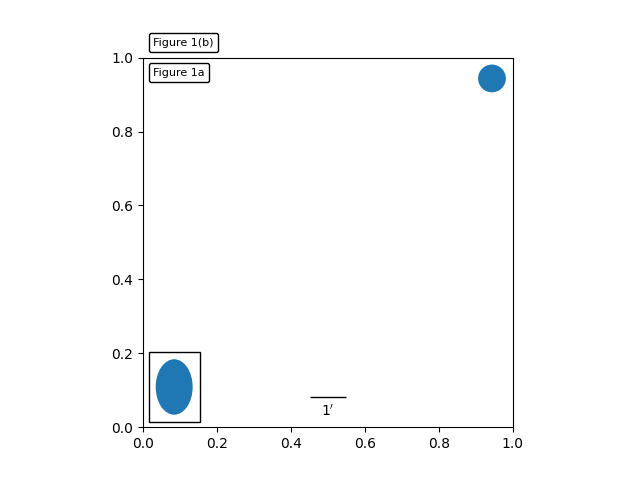
import matplotlib.pyplot as pltdef draw_text(ax):"""Draw two text-boxes, anchored by different corners to the upper-leftcorner of the figure."""from matplotlib.offsetbox import AnchoredTextat = AnchoredText("Figure 1a",loc='upper left', prop=dict(size=8), frameon=True,)at.patch.set_boxstyle("round,pad=0.,rounding_size=0.2")ax.add_artist(at)at2 = AnchoredText("Figure 1(b)",loc='lower left', prop=dict(size=8), frameon=True,bbox_to_anchor=(0., 1.),bbox_transform=ax.transAxes)at2.patch.set_boxstyle("round,pad=0.,rounding_size=0.2")ax.add_artist(at2)def draw_circle(ax):"""Draw a circle in axis coordinates"""from mpl_toolkits.axes_grid1.anchored_artists import AnchoredDrawingAreafrom matplotlib.patches import Circleada = AnchoredDrawingArea(20, 20, 0, 0,loc='upper right', pad=0., frameon=False)p = Circle((10, 10), 10)ada.da.add_artist(p)ax.add_artist(ada)def draw_ellipse(ax):"""Draw an ellipse of width=0.1, height=0.15 in data coordinates"""from mpl_toolkits.axes_grid1.anchored_artists import AnchoredEllipseae = AnchoredEllipse(ax.transData, width=0.1, height=0.15, angle=0.,loc='lower left', pad=0.5, borderpad=0.4,frameon=True)ax.add_artist(ae)def draw_sizebar(ax):"""Draw a horizontal bar with length of 0.1 in data coordinates,with a fixed label underneath."""from mpl_toolkits.axes_grid1.anchored_artists import AnchoredSizeBarasb = AnchoredSizeBar(ax.transData,0.1,r"1$^{\prime}$",loc='lower center',pad=0.1, borderpad=0.5, sep=5,frameon=False)ax.add_artist(asb)ax = plt.gca()ax.set_aspect(1.)draw_text(ax)draw_circle(ax)draw_ellipse(ax)draw_sizebar(ax)plt.show()
下载这个示例

若有收获,就点个赞吧
0 人点赞


