Contourf演示
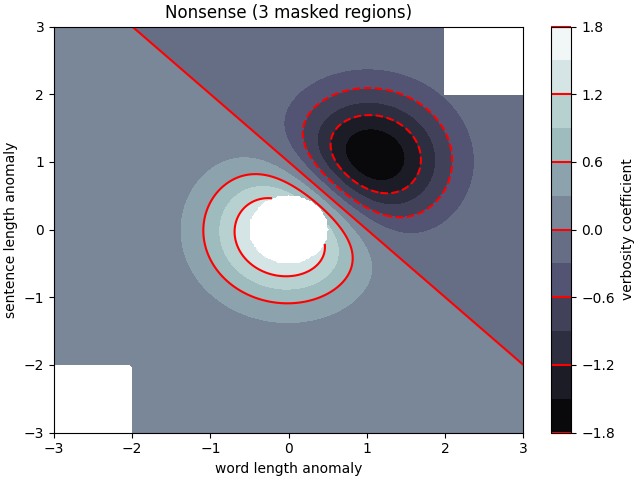
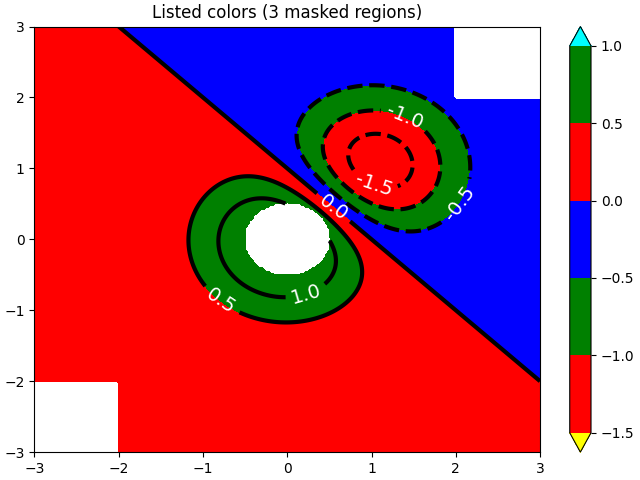
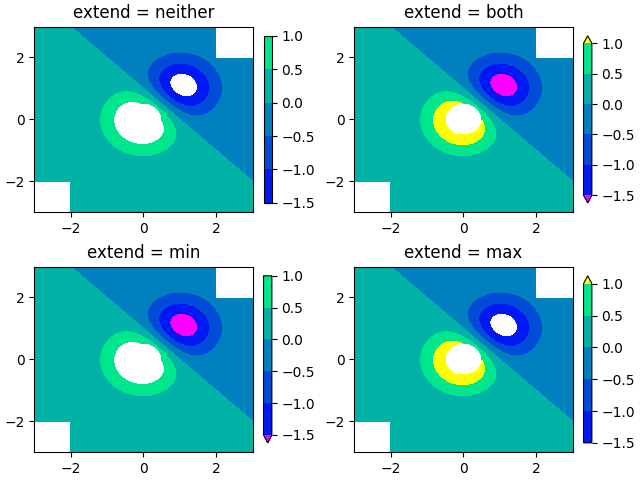
如何使用 axes.Axes.contourf() 方法创建填充的等高线图。
import numpy as npimport matplotlib.pyplot as pltorigin = 'lower'delta = 0.025x = y = np.arange(-3.0, 3.01, delta)X, Y = np.meshgrid(x, y)Z1 = np.exp(-X**2 - Y**2)Z2 = np.exp(-(X - 1)**2 - (Y - 1)**2)Z = (Z1 - Z2) * 2nr, nc = Z.shape# put NaNs in one corner:Z[-nr // 6:, -nc // 6:] = np.nan# contourf will convert these to maskedZ = np.ma.array(Z)# mask another corner:Z[:nr // 6, :nc // 6] = np.ma.masked# mask a circle in the middle:interior = np.sqrt((X**2) + (Y**2)) < 0.5Z[interior] = np.ma.masked# We are using automatic selection of contour levels;# this is usually not such a good idea, because they don't# occur on nice boundaries, but we do it here for purposes# of illustration.fig1, ax2 = plt.subplots(constrained_layout=True)CS = ax2.contourf(X, Y, Z, 10, cmap=plt.cm.bone, origin=origin)# Note that in the following, we explicitly pass in a subset of# the contour levels used for the filled contours. Alternatively,# We could pass in additional levels to provide extra resolution,# or leave out the levels kwarg to use all of the original levels.CS2 = ax2.contour(CS, levels=CS.levels[::2], colors='r', origin=origin)ax2.set_title('Nonsense (3 masked regions)')ax2.set_xlabel('word length anomaly')ax2.set_ylabel('sentence length anomaly')# Make a colorbar for the ContourSet returned by the contourf call.cbar = fig1.colorbar(CS)cbar.ax.set_ylabel('verbosity coefficient')# Add the contour line levels to the colorbarcbar.add_lines(CS2)fig2, ax2 = plt.subplots(constrained_layout=True)# Now make a contour plot with the levels specified,# and with the colormap generated automatically from a list# of colors.levels = [-1.5, -1, -0.5, 0, 0.5, 1]CS3 = ax2.contourf(X, Y, Z, levels,colors=('r', 'g', 'b'),origin=origin,extend='both')# Our data range extends outside the range of levels; make# data below the lowest contour level yellow, and above the# highest level cyan:CS3.cmap.set_under('yellow')CS3.cmap.set_over('cyan')CS4 = ax2.contour(X, Y, Z, levels,colors=('k',),linewidths=(3,),origin=origin)ax2.set_title('Listed colors (3 masked regions)')ax2.clabel(CS4, fmt='%2.1f', colors='w', fontsize=14)# Notice that the colorbar command gets all the information it# needs from the ContourSet object, CS3.fig2.colorbar(CS3)# Illustrate all 4 possible "extend" settings:extends = ["neither", "both", "min", "max"]cmap = plt.cm.get_cmap("winter")cmap.set_under("magenta")cmap.set_over("yellow")# Note: contouring simply excludes masked or nan regions, so# instead of using the "bad" colormap value for them, it draws# nothing at all in them. Therefore the following would have# no effect:# cmap.set_bad("red")fig, axs = plt.subplots(2, 2, constrained_layout=True)for ax, extend in zip(axs.ravel(), extends):cs = ax.contourf(X, Y, Z, levels, cmap=cmap, extend=extend, origin=origin)fig.colorbar(cs, ax=ax, shrink=0.9)ax.set_title("extend = %s" % extend)ax.locator_params(nbins=4)plt.show()
参考
此示例中显示了以下函数,方法和类的使用:
import matplotlibmatplotlib.axes.Axes.contourmatplotlib.pyplot.contourmatplotlib.axes.Axes.contourfmatplotlib.pyplot.contourfmatplotlib.axes.Axes.clabelmatplotlib.pyplot.clabelmatplotlib.figure.Figure.colorbarmatplotlib.pyplot.colorbarmatplotlib.colors.Colormapmatplotlib.colors.Colormap.set_badmatplotlib.colors.Colormap.set_undermatplotlib.colors.Colormap.set_over
下载这个示例

若有收获,就点个赞吧
0 人点赞


