图像的仿射变换
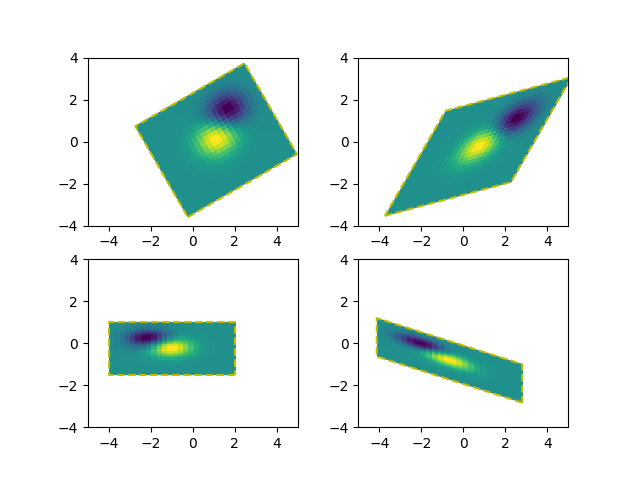
将仿射变换(Affine2D)预先添加到图像的数据变换允许操纵图像的形状和方向。这是变换链的概念的一个例子。
对于支持具有可选仿射变换的draw_image的后端(例如,agg,ps后端),输出的图像应该使其边界与虚线黄色矩形匹配。
import numpy as npimport matplotlib.pyplot as pltimport matplotlib.transforms as mtransformsdef get_image():delta = 0.25x = y = np.arange(-3.0, 3.0, delta)X, Y = np.meshgrid(x, y)Z1 = np.exp(-X**2 - Y**2)Z2 = np.exp(-(X - 1)**2 - (Y - 1)**2)Z = (Z1 - Z2)return Zdef do_plot(ax, Z, transform):im = ax.imshow(Z, interpolation='none',origin='lower',extent=[-2, 4, -3, 2], clip_on=True)trans_data = transform + ax.transDataim.set_transform(trans_data)# display intended extent of the imagex1, x2, y1, y2 = im.get_extent()ax.plot([x1, x2, x2, x1, x1], [y1, y1, y2, y2, y1], "y--",transform=trans_data)ax.set_xlim(-5, 5)ax.set_ylim(-4, 4)# prepare image and figurefig, ((ax1, ax2), (ax3, ax4)) = plt.subplots(2, 2)Z = get_image()# image rotationdo_plot(ax1, Z, mtransforms.Affine2D().rotate_deg(30))# image skewdo_plot(ax2, Z, mtransforms.Affine2D().skew_deg(30, 15))# scale and reflectiondo_plot(ax3, Z, mtransforms.Affine2D().scale(-1, .5))# everything and a translationdo_plot(ax4, Z, mtransforms.Affine2D().rotate_deg(30).skew_deg(30, 15).scale(-1, .5).translate(.5, -1))plt.show()
参考
此示例中显示了以下函数,方法和类的使用:
import matplotlibmatplotlib.axes.Axes.imshowmatplotlib.pyplot.imshowmatplotlib.transforms.Affine2D
下载这个示例

若有收获,就点个赞吧
0 人点赞


