编写自定义数据集,数据加载器和转换
原文: https://pytorch.org/tutorials/beginner/data_loading_tutorial.html
注意
单击此处的下载完整的示例代码
解决任何机器学习问题都需要花费大量精力来准备数据。 PyTorch 提供了许多工具来简化数据加载过程,并有望使代码更具可读性。 在本教程中,我们将了解如何从非空的数据集中加载和预处理/增强数据。
要运行本教程,请确保已安装以下软件包:
scikit-image:用于图像 io 和变换pandas:用于更轻松的 csv 解析
from __future__ import print_function, divisionimport osimport torchimport pandas as pdfrom skimage import io, transformimport numpy as npimport matplotlib.pyplot as pltfrom torch.utils.data import Dataset, DataLoaderfrom torchvision import transforms, utils# Ignore warningsimport warningswarnings.filterwarnings("ignore")plt.ion() # interactive mode
我们要处理的数据集是面部姿势数据集。 这意味着将对面部进行如下注释:

总体上,每个面孔都标注了 68 个不同的界标点。
Note
从此处下载数据集,将图像存放于名为“ data / faces /”的目录中。 该数据集实际上是通过对来自标记为“面部”的 imagenet 上的一些图像应用出色的 dlib 姿态估计生成的。
数据集带有一个带注释的 csv 文件,如下所示:
image_name,part_0_x,part_0_y,part_1_x,part_1_y,part_2_x, ... ,part_67_x,part_67_y0805personali01.jpg,27,83,27,98, ... 84,1341084239450_e76e00b7e7.jpg,70,236,71,257, ... ,128,312
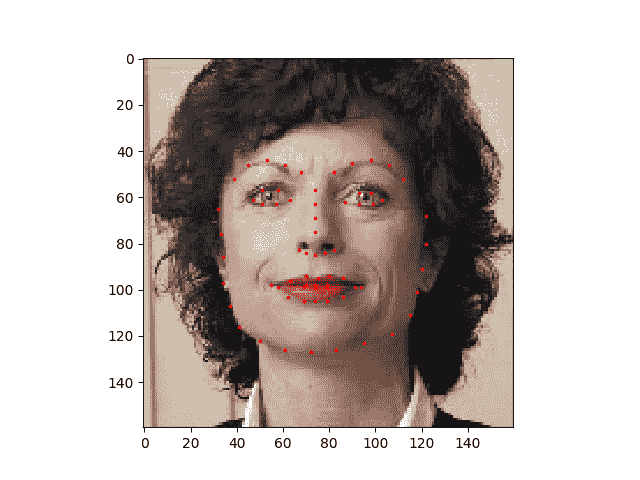
让我们快速阅读 CSV 并获取(N,2)数组中的注释,其中 N 是地标数。
landmarks_frame = pd.read_csv('data/faces/face_landmarks.csv')n = 65img_name = landmarks_frame.iloc[n, 0]landmarks = landmarks_frame.iloc[n, 1:]landmarks = np.asarray(landmarks)landmarks = landmarks.astype('float').reshape(-1, 2)print('Image name: {}'.format(img_name))print('Landmarks shape: {}'.format(landmarks.shape))print('First 4 Landmarks: {}'.format(landmarks[:4]))
输出:
Image name: person-7.jpgLandmarks shape: (68, 2)First 4 Landmarks: [[32. 65.][33. 76.][34. 86.][34. 97.]]
让我们编写一个简单的辅助函数来显示图像及其地标,并使用它来显示示例。
def show_landmarks(image, landmarks):"""Show image with landmarks"""plt.imshow(image)plt.scatter(landmarks[:, 0], landmarks[:, 1], s=10, marker='.', c='r')plt.pause(0.001) # pause a bit so that plots are updatedplt.figure()show_landmarks(io.imread(os.path.join('data/faces/', img_name)),landmarks)plt.show()
数据集类
torch.utils.data.Dataset是代表数据集的抽象类。 您的自定义数据集应继承Dataset并覆盖以下方法:
__len__,以便len(dataset)返回数据集的大小。__getitem__支持索引,以便可以使用dataset[i]获取第 个样本
个样本
让我们为面部轮廓数据集创建一个数据集类。 我们将在__init__中读取 csv,但将图像读取留给__getitem__。 由于所有图像不会立即存储在内存中,而是根据需要读取,因此可以提高存储效率。
我们的数据集样本将是 dict {'image': image, 'landmarks': landmarks}。 我们的数据集将使用可选参数transform,以便可以将任何所需的处理应用于样本。 我们将在下一部分中看到transform的有用性。
class FaceLandmarksDataset(Dataset):"""Face Landmarks dataset."""def __init__(self, csv_file, root_dir, transform=None):"""Args:csv_file (string): Path to the csv file with annotations.root_dir (string): Directory with all the images.transform (callable, optional): Optional transform to be appliedon a sample."""self.landmarks_frame = pd.read_csv(csv_file)self.root_dir = root_dirself.transform = transformdef __len__(self):return len(self.landmarks_frame)def __getitem__(self, idx):if torch.is_tensor(idx):idx = idx.tolist()img_name = os.path.join(self.root_dir,self.landmarks_frame.iloc[idx, 0])image = io.imread(img_name)landmarks = self.landmarks_frame.iloc[idx, 1:]landmarks = np.array([landmarks])landmarks = landmarks.astype('float').reshape(-1, 2)sample = {'image': image, 'landmarks': landmarks}if self.transform:sample = self.transform(sample)return sample
让我们实例化该类并遍历数据样本。 我们将打印前 4 个样本的大小并显示其地标。
face_dataset = FaceLandmarksDataset(csv_file='data/faces/face_landmarks.csv',root_dir='data/faces/')fig = plt.figure()for i in range(len(face_dataset)):sample = face_dataset[i]print(i, sample['image'].shape, sample['landmarks'].shape)ax = plt.subplot(1, 4, i + 1)plt.tight_layout()ax.set_title('Sample #{}'.format(i))ax.axis('off')show_landmarks(**sample)if i == 3:plt.show()break

输出:
0 (324, 215, 3) (68, 2)1 (500, 333, 3) (68, 2)2 (250, 258, 3) (68, 2)3 (434, 290, 3) (68, 2)
Transforms 变换
从上面可以看到的一个问题是样本的大小不同。 大多数神经网络期望图像的大小固定。 因此,我们将需要编写一些预处理代码。 让我们创建三个转换:
Rescale:缩放图像RandomCrop:从图像中随机裁剪。 这是数据增强。ToTensor:将 numpy 图像转换为 torch 图像(我们需要交换轴)。
我们会将它们编写为可调用的类,而不是简单的函数,这样就不必每次调用转换时都传递其参数。 为此,我们只需要实现__call__方法,如果需要,还可以实现__init__方法。 然后我们可以使用这样的变换:
tsfm = Transform(params)transformed_sample = tsfm(sample)
在下面观察如何将这些变换同时应用于图像和地标。
class Rescale(object):"""Rescale the image in a sample to a given size.Args:output_size (tuple or int): Desired output size. If tuple, output ismatched to output_size. If int, smaller of image edges is matchedto output_size keeping aspect ratio the same."""def __init__(self, output_size):assert isinstance(output_size, (int, tuple))self.output_size = output_sizedef __call__(self, sample):image, landmarks = sample['image'], sample['landmarks']h, w = image.shape[:2]if isinstance(self.output_size, int):if h > w:new_h, new_w = self.output_size * h / w, self.output_sizeelse:new_h, new_w = self.output_size, self.output_size * w / helse:new_h, new_w = self.output_sizenew_h, new_w = int(new_h), int(new_w)img = transform.resize(image, (new_h, new_w))# h and w are swapped for landmarks because for images,# x and y axes are axis 1 and 0 respectivelylandmarks = landmarks * [new_w / w, new_h / h]return {'image': img, 'landmarks': landmarks}class RandomCrop(object):"""Crop randomly the image in a sample.Args:output_size (tuple or int): Desired output size. If int, square cropis made."""def __init__(self, output_size):assert isinstance(output_size, (int, tuple))if isinstance(output_size, int):self.output_size = (output_size, output_size)else:assert len(output_size) == 2self.output_size = output_sizedef __call__(self, sample):image, landmarks = sample['image'], sample['landmarks']h, w = image.shape[:2]new_h, new_w = self.output_sizetop = np.random.randint(0, h - new_h)left = np.random.randint(0, w - new_w)image = image[top: top + new_h,left: left + new_w]landmarks = landmarks - [left, top]return {'image': image, 'landmarks': landmarks}class ToTensor(object):"""Convert ndarrays in sample to Tensors."""def __call__(self, sample):image, landmarks = sample['image'], sample['landmarks']# swap color axis because# numpy image: H x W x C# torch image: C X H X Wimage = image.transpose((2, 0, 1))return {'image': torch.from_numpy(image),'landmarks': torch.from_numpy(landmarks)}
撰写变换
现在,我们将转换应用于样本。
假设我们要将图片的较短边重新缩放为 256,然后从中随机裁剪一个尺寸为 224 的正方形。 也就是说,我们要组成Rescale和RandomCrop转换。 torchvision.transforms.Compose是一个简单的可调用类,它使我们可以执行此操作。
scale = Rescale(256)crop = RandomCrop(128)composed = transforms.Compose([Rescale(256),RandomCrop(224)])# Apply each of the above transforms on sample.fig = plt.figure()sample = face_dataset[65]for i, tsfrm in enumerate([scale, crop, composed]):transformed_sample = tsfrm(sample)ax = plt.subplot(1, 3, i + 1)plt.tight_layout()ax.set_title(type(tsfrm).__name__)show_landmarks(**transformed_sample)plt.show()

遍历数据集
让我们将所有这些放在一起,以创建具有组合转换的数据集。 总而言之,每次采样此数据集时:
- 从文件中即时读取图像
- 转换应用于读取的图像
- 由于其中一种转换是随机的,因此数据是在采样时进行增强
我们可以像以前一样使用for i in range循环遍历创建的数据集。
transformed_dataset = FaceLandmarksDataset(csv_file='data/faces/face_landmarks.csv',root_dir='data/faces/',transform=transforms.Compose([Rescale(256),RandomCrop(224),ToTensor()]))for i in range(len(transformed_dataset)):sample = transformed_dataset[i]print(i, sample['image'].size(), sample['landmarks'].size())if i == 3:break
输出:
0 torch.Size([3, 224, 224]) torch.Size([68, 2])1 torch.Size([3, 224, 224]) torch.Size([68, 2])2 torch.Size([3, 224, 224]) torch.Size([68, 2])3 torch.Size([3, 224, 224]) torch.Size([68, 2])
但是,通过使用简单的for循环迭代数据,我们失去了很多功能。 特别是,我们错过了:
- 批量处理数据
- 打乱数据
- 使用
multiprocessing工作程序并行加载数据。
torch.utils.data.DataLoader是提供所有这些功能的迭代器。 下面使用的参数应该清楚。 感兴趣的一个参数是collate_fn。 您可以使用collate_fn指定需要如何精确地分批样品。 但是,默认精度在大多数情况下都可以正常工作。
dataloader = DataLoader(transformed_dataset, batch_size=4,shuffle=True, num_workers=4)# Helper function to show a batchdef show_landmarks_batch(sample_batched):"""Show image with landmarks for a batch of samples."""images_batch, landmarks_batch = \sample_batched['image'], sample_batched['landmarks']batch_size = len(images_batch)im_size = images_batch.size(2)grid_border_size = 2grid = utils.make_grid(images_batch)plt.imshow(grid.numpy().transpose((1, 2, 0)))for i in range(batch_size):plt.scatter(landmarks_batch[i, :, 0].numpy() + i * im_size + (i + 1) * grid_border_size,landmarks_batch[i, :, 1].numpy() + grid_border_size,s=10, marker='.', c='r')plt.title('Batch from dataloader')for i_batch, sample_batched in enumerate(dataloader):print(i_batch, sample_batched['image'].size(),sample_batched['landmarks'].size())# observe 4th batch and stop.if i_batch == 3:plt.figure()show_landmarks_batch(sample_batched)plt.axis('off')plt.ioff()plt.show()break

输出:
0 torch.Size([4, 3, 224, 224]) torch.Size([4, 68, 2])1 torch.Size([4, 3, 224, 224]) torch.Size([4, 68, 2])2 torch.Size([4, 3, 224, 224]) torch.Size([4, 68, 2])3 torch.Size([4, 3, 224, 224]) torch.Size([4, 68, 2])
后记:torchvision
在本教程中,我们已经看到了如何编写和使用数据集,转换和数据加载器。 torchvision包提供了一些常见的数据集和转换。 您甚至不必编写自定义类。 Torchvision 中可用的更通用的数据集之一是ImageFolder。 假定图像的组织方式如下:
root/ants/xxx.pngroot/ants/xxy.jpegroot/ants/xxz.png...root/bees/123.jpgroot/bees/nsdf3.pngroot/bees/asd932_.png
其中“蚂蚁”,“蜜蜂”等是类别标签。 同样也可以使用对PIL.Image,Scale等PIL.Image进行操作的通用转换。 您可以使用以下代码编写数据加载器,如下所示:
import torchfrom torchvision import transforms, datasetsdata_transform = transforms.Compose([transforms.RandomSizedCrop(224),transforms.RandomHorizontalFlip(),transforms.ToTensor(),transforms.Normalize(mean=[0.485, 0.456, 0.406],std=[0.229, 0.224, 0.225])])hymenoptera_dataset = datasets.ImageFolder(root='hymenoptera_data/train',transform=data_transform)dataset_loader = torch.utils.data.DataLoader(hymenoptera_dataset,batch_size=4, shuffle=True,num_workers=4)
有关训练代码的示例,请参见计算机视觉转换学习教程。
脚本的总运行时间:(0 分钟 58.611 秒)
Download Python source code: data_loading_tutorial.py Download Jupyter notebook: data_loading_tutorial.ipynb
由狮身人面像画廊生成的画廊

若有收获,就点个赞吧
0 人点赞


