演示 - ChooseDropAction
原文: https://docs.oracle.com/javase/tutorial/uiswing/dnd/dropactiondemo.html
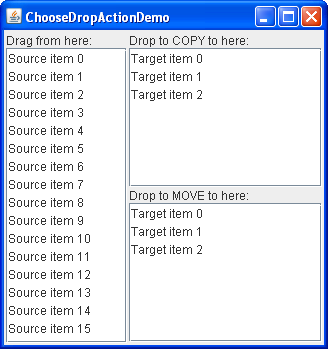
以下演示ChooseDropActionDemo包含三个列表。正如您在屏幕截图中看到的那样,左侧的列表标记为“从此处拖动”,是拖动源。此列表支持移动和复制,但它不实现导入 - 因此您不能放入它。
在右侧有两个列表作为放置目标。标有“Drop to COPY here”的顶部列表仅允许将数据复制到其中。标有“Drop to MOVE here”的底部列表只允许将数据移动到它。源列表仅允许从中拖动数据。
Try this:
单击启动按钮以使用 Java™Web Start (下载 JDK 7 或更高版本)运行
ChooseDropActionDemo。或者,要自己编译并运行示例,请参考示例索引。
在源列表中选择一个项目并拖动到上部目标列表。当您在目标上拖动时,请注意,即使您没有按住 Control 键表示您想要复制操作,也会显示复制 - 拖放鼠标光标。 (请注意,除非您按 Option 键,否则复制光标不会出现在 Macintosh 平台上。)
- 放下物品。它被插入到目标列表中,但不会从源中删除 - 根据需要。
- 再次从源列表中拖动,但这次进入较低的目标列表。放下物品。它将插入目标列表并从源列表中删除。
- 在源列表中选择另一个项目,并在按 Control 键指示 COPY 操作的首选项时,将项目拖动到下一个目标列表。
- 将项目放入列表中。未插入项目 - 拒绝丢弃。传输处理器的
canImport方法被编码为拒绝 COPY 操作,但它可以被实现为返回 true,在这种情况下,用户操作将占优势并且将发生复制。
正如您可能猜到的, ChooseDropActionDemo.java示例包含两个TransferHandler实现:
/*** The FromTransferHandler allows dragging from the list and* supports both copy and move actions. This transfer handler* does not support import.*/class FromTransferHandler extends TransferHandler {public int getSourceActions(JComponent comp) {return COPY_OR_MOVE;}private int index = 0;public Transferable createTransferable(JComponent comp) {index = dragFrom.getSelectedIndex();if (index < 0 || index >= from.getSize()) {return null;}return new StringSelection((String)dragFrom.getSelectedValue());}public void exportDone(JComponent comp, Transferable trans, int action) {if (action != MOVE) {return;}from.removeElementAt(index);}}/*** The ToTransferHandler has a constructor that specifies whether the* instance will support only the copy action or the move action.* This transfer handler does not support export.*/class ToTransferHandler extends TransferHandler {int action;public ToTransferHandler(int action) {this.action = action;}public boolean canImport(TransferHandler.TransferSupport support) {// for the demo, we will only support drops (not clipboard paste)if (!support.isDrop()) {return false;}// we only import Stringsif (!support.isDataFlavorSupported(DataFlavor.stringFlavor)) {return false;}// check if the source actions contain the desired action -// either copy or move, depending on what was specified when// this instance was createdboolean actionSupported = (action & support.getSourceDropActions()) == action;if (actionSupported) {support.setDropAction(action);return true;}// the desired action is not supported, so reject the transferreturn false;}public boolean importData(TransferHandler.TransferSupport support) {// if we cannot handle the import, say soif (!canImport(support)) {return false;}// fetch the drop locationJList.DropLocation dl = (JList.DropLocation)support.getDropLocation();int index = dl.getIndex();// fetch the data and bail if this failsString data;try {data = (String)support.getTransferable().getTransferData(DataFlavor.stringFlavor);} catch (UnsupportedFlavorException e) {return false;} catch (java.io.IOException e) {return false;}JList list = (JList)support.getComponent();DefaultListModel model = (DefaultListModel)list.getModel();model.insertElementAt(data, index);Rectangle rect = list.getCellBounds(index, index);list.scrollRectToVisible(rect);list.setSelectedIndex(index);list.requestFocusInWindow();return true;}}
附加到源列表的FromTransferHandler允许从列表中拖动并支持复制和移动操作。如果您尝试删除此列表,则丢弃将被拒绝,因为FromTransferHandler尚未实现canImport和importData方法。
[COG0]附加到仅移动和仅复制目标列表,包含一个构造器,指定目标列表是仅允许复制还是仅移动。支持复制操作的实例附加到仅复制列表,支持移动操作的实例附加到仅移动列表。
您可能也对顶级 Drop 示例感兴趣,该示例还说明了选择放置操作。
接下来我们看一下显示放置位置。

若有收获,就点个赞吧
0 人点赞


