推荐TV内容
编写:awong1900 - 原文:http://developer.android.com/training/tv/discovery/recommendations.html
当操作TV时,用户通常喜欢使用最少的输入操作来找内容。许多用户的理想场景是,坐下,打开TV然后观看。用最少的步骤让用户观看他们的喜欢的内容是最好的方式。
Android framework为了实现较少交互而提供了主屏幕推荐栏。在设备第一次使用时候,内容推荐出现在TV主屏幕的第一栏。应用程序的内容目录提供推荐建议可以把用户带回到我们的应用。
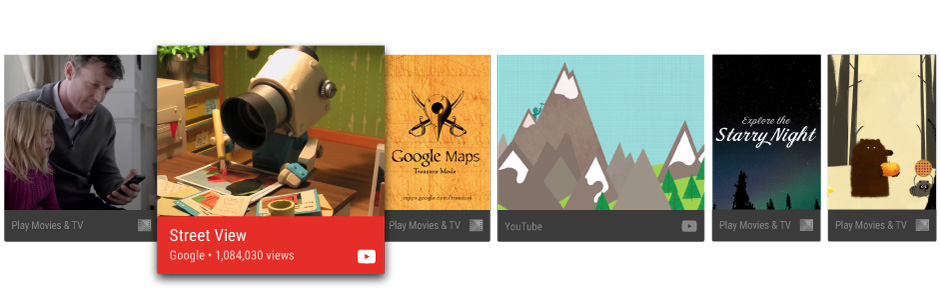 图1. 一个推荐栏的例子
这节课教我们如何创建推荐和提供他们到Android framework,这样用户能容易的发现和使用我们的应用内容。这个讨论描述了一些代码,在Android Leanback示例代码。
创建推荐服务
内容推荐是被后台处理创建。为了把我们的应用提供到内容推荐,创建一个周期性添加列表服务,从应用目录到系统推荐列表。
接下来的代码描绘了如何扩展IntentService为我们的应用创建推荐服务:
public class UpdateRecommendationsService extends IntentService {private static final String TAG = "UpdateRecommendationsService";private static final int MAX_RECOMMENDATIONS = 3;public UpdateRecommendationsService() {super("RecommendationService");}@Overrideprotected void onHandleIntent(Intent intent) {Log.d(TAG, "Updating recommendation cards");HashMap<String, List<Movie>> recommendations = VideoProvider.getMovieList();if (recommendations == null) return;int count = 0;try {RecommendationBuilder builder = new RecommendationBuilder().setContext(getApplicationContext()).setSmallIcon(R.drawable.videos_by_google_icon);for (Map.Entry<String, List<Movie>> entry : recommendations.entrySet()) {for (Movie movie : entry.getValue()) {Log.d(TAG, "Recommendation - " + movie.getTitle());builder.setBackground(movie.getCardImageUrl()).setId(count + 1).setPriority(MAX_RECOMMENDATIONS - count).setTitle(movie.getTitle()).setDescription(getString(R.string.popular_header)).setImage(movie.getCardImageUrl()).setIntent(buildPendingIntent(movie)).build();if (++count >= MAX_RECOMMENDATIONS) {break;}}if (++count >= MAX_RECOMMENDATIONS) {break;}}} catch (IOException e) {Log.e(TAG, "Unable to update recommendation", e);}}private PendingIntent buildPendingIntent(Movie movie) {Intent detailsIntent = new Intent(this, DetailsActivity.class);detailsIntent.putExtra("Movie", movie);TaskStackBuilder stackBuilder = TaskStackBuilder.create(this);stackBuilder.addParentStack(DetailsActivity.class);stackBuilder.addNextIntent(detailsIntent);// Ensure a unique PendingIntents, otherwise all recommendations end up with the same// PendingIntentdetailsIntent.setAction(Long.toString(movie.getId()));PendingIntent intent = stackBuilder.getPendingIntent(0, PendingIntent.FLAG_UPDATE_CURRENT);return intent;}}
使服务被系统意识和运行,在应用manifest中注册它,接下来的代码片段展示了如何定义这个类做为服务:
<manifest ... ><application ... >...<serviceandroid:name="com.example.android.tvleanback.UpdateRecommendationsService"android:enabled="true" /></application></manifest>
刷新推荐
基于用户的行为和数据来推荐,例如播放列表,喜爱列表和相关内容。当刷新推荐时,不仅仅是删除和重新加载他们,因为这样会导致推荐出现在推荐栏的结尾。一旦一个内容项被播放,如一个影片,从推荐中删除它。
应用的推荐顺序被保存依据应用提供他们的顺序。framework interleave应用推荐基于推荐质量,用户习惯的收集。最好的推荐应是推荐最合适的出现在列表前面。
创建推荐
一旦我们的推荐服务开始运行,它必须创建推荐和推送他们到Android framework。Framework收到推荐作为通知对象。它用特定的模板并且标记为特定的目录。
设置值
去设置推荐卡片的UI元素,创建一个builder类用接下来的builder样式描述。首先,设置推荐卡片元素的值。
public class RecommendationBuilder {...public RecommendationBuilder setTitle(String title) {mTitle = title;return this;}public RecommendationBuilder setDescription(String description) {mDescription = description;return this;}public RecommendationBuilder setImage(String uri) {mImageUri = uri;return this;}public RecommendationBuilder setBackground(String uri) {mBackgroundUri = uri;return this;}...
创建通知
一旦我们设置了值,然后去创建通知,从builder类分配值到通知,并且调用NotificationCompat.Builder.build)。
并且,确信调用setLocalOnly()),这样NotificationCompat.BigPictureStyle通知不将显示在另一个设备。
接下来的代码示例展示了如何创建推荐。
public class RecommendationBuilder {...public Notification build() throws IOException {...Notification notification = new NotificationCompat.BigPictureStyle(new NotificationCompat.Builder(mContext).setContentTitle(mTitle).setContentText(mDescription).setPriority(mPriority).setLocalOnly(true).setOngoing(true).setColor(mContext.getResources().getColor(R.color.fastlane_background)).setCategory(Notification.CATEGORY_RECOMMENDATION).setLargeIcon(image).setSmallIcon(mSmallIcon).setContentIntent(mIntent).setExtras(extras)).build();return notification;}}
运行推荐服务
我们的应用推荐服务必须周期性运行确保创建当前的推荐。去运行我们的服务,创建一个类运行计时器和在周期间隔关联它。接下来的代码例子扩展了BroadcastReceiver类去开始每半小时的推荐服务的周期性执行:
public class BootupActivity extends BroadcastReceiver {private static final String TAG = "BootupActivity";private static final long INITIAL_DELAY = 5000;@Overridepublic void onReceive(Context context, Intent intent) {Log.d(TAG, "BootupActivity initiated");if (intent.getAction().endsWith(Intent.ACTION_BOOT_COMPLETED)) {scheduleRecommendationUpdate(context);}}private void scheduleRecommendationUpdate(Context context) {Log.d(TAG, "Scheduling recommendations update");AlarmManager alarmManager = (AlarmManager) context.getSystemService(Context.ALARM_SERVICE);Intent recommendationIntent = new Intent(context, UpdateRecommendationsService.class);PendingIntent alarmIntent = PendingIntent.getService(context, 0, recommendationIntent, 0);alarmManager.setInexactRepeating(AlarmManager.ELAPSED_REALTIME_WAKEUP,INITIAL_DELAY,AlarmManager.INTERVAL_HALF_HOUR,alarmIntent);}}
这个BroadcastReceiver类的实现必须运行在TV设备启动后。 为了完成这个,注册这个类在应用manifest的intet filter中,它监听设备启动完成。接下来的代码展示了如何添加这个配置到manifest。
<manifest ... ><application ... ><receiver android:name="com.example.android.tvleanback.BootupActivity"android:enabled="true"android:exported="false"><intent-filter><action android:name="android.intent.action.BOOT_COMPLETED"/></intent-filter></receiver></application></manifest>
Important: 接收一个启动完成通知需要我们的应用有RECEIVE_BOOT_COMPLETED权限。更多信息,查看ACTION_BOOT_COMPLETED。
在推荐服务类的onHandleIntent())方法中,用以下代码提交推荐到管理器:
Notification notification = notificationBuilder.build();mNotificationManager.notify(id, notification);

若有收获,就点个赞吧
0 人点赞


