特征工程结构化数据分类
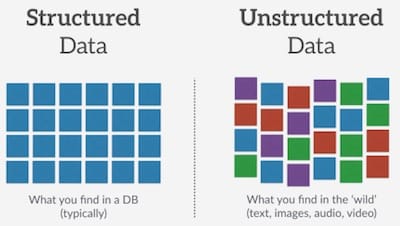
TF2.0 TensorFlow 2 / 2.0 中文文档 - 结构化数据分类 Classify structured data
主要内容:介绍如何对结构化数据(例如 CSV 中的表格数据)分类。
这个教程包含完整的代码:
- 使用 Pandas 加载 CSV 文件。
- 使用 tf.data 打乱数据并获取batch。
- 使用特征工程(feature columns)将 CSV 中的列映射为特征值(features)
- 使用 Keras 搭建、训练和评估模型。
数据集
数据集由 Cleveland Clinic Foundation 提供的几百行心脏病数据构成。每一行代表一个病人,每一列描述一个属性,数据共14列,最后一列为是否患病。我们将使用这些信息预测一个病人是否有心脏病。这是一个典型的二分分类问题。
| 列 | 描述 | 特征类型 | 数据类型 |
|---|---|---|---|
| Age | 年龄 | 数值 | integer |
| Sex | 性别(1男性; 0女性) | 类别 | integer |
| … | … | … | … |
| Thal | 3 = normal; 6 = fixed defect; 7 = reversable defect | 类别 | string |
| Target | 是否感染,(1是;0否) | 分类 | integer |
导入库
pip install -q sklearnpip install -q tensorflow==2.0.0-beta1
import numpy as npimport pandas as pdimport tensorflow as tffrom tensorflow import feature_columnfrom tensorflow.keras import layersfrom sklearn.model_selection import train_test_split
使用 Pandas 读取数据
URL = 'https://storage.googleapis.com/applied-dl/heart.csv'dataframe = pd.read_csv(URL)dataframe.head()
| - | age | sex | cp | … | slope | ca | thal | target |
|---|---|---|---|---|---|---|---|---|
| 0 | 63 | 1 | 1 | 3 | 0 | fixed | 0 | |
| 1 | 67 | 1 | 4 | 2 | 3 | normal | 1 | |
| 2 | 67 | 1 | 4 | 2 | 2 | reversible | 0 | |
| 3 | 37 | 1 | 3 | 3 | 0 | normal | 0 | |
| 4 | 41 | 0 | 2 | 1 | 0 | normal | 0 |
分割训练集、验证集和测试集
train, test = train_test_split(dataframe, test_size=0.2)train, val = train_test_split(train, test_size=0.2)print(len(train), 'train examples') # 193print(len(val), 'validation examples') # 49print(len(test), 'test examples') # 61
创建 input pipeline
使用 tf.data ,我们可以使用特征工程(feature columns)将 Pandas DataFrame 中的列映射为特征值(features)。如果是一个非常大的 CSV 文件,不能直接放在内存中,就必须直接使用 tf.data 从磁盘中直接读取数据了。
# 帮助函数,返回 tf.data 数据集。def df_to_dataset(dataframe, shuffle=True, batch_size=32):dataframe = dataframe.copy()labels = dataframe.pop('target')ds = tf.data.Dataset.from_tensor_slices((dict(dataframe), labels))if shuffle:ds = ds.shuffle(buffer_size=len(dataframe))ds = ds.batch(batch_size)return ds
batch_size = 5 # 为了方面展示下面的示例,batch暂时设置为5。train_ds = df_to_dataset(train, batch_size=batch_size)val_ds = df_to_dataset(val, shuffle=False, batch_size=batch_size)test_ds = df_to_dataset(test, shuffle=False, batch_size=batch_size)
理解 input pipeline
for feature_batch, label_batch in train_ds.take(1):print('Every feature:', list(feature_batch.keys()))print('A batch of ages:', feature_batch['age'])print('A batch of targets:', label_batch )
Every feature: ['cp', 'age', 'sex', ... , 'slope', 'ca']A batch of ages: tf.Tensor([50 62 37 69 58], shape=(5,), dtype=int32)A batch of targets: tf.Tensor([0 0 0 0 0], shape=(5,), dtype=int32)
可以看到数据集返回了一个键为列名的字典。
特征列示例
TensorFlow 提供了很多种类型的特征列(feature column),接下来给几个例子看一看每一列的值是怎么被转换的。
example_batch = next(iter(train_ds))[0]# 帮助函数:创建一个特征列,并转换。def demo(feature_column):feature_layer = layers.DenseFeatures(feature_column)print(feature_layer(example_batch).numpy())
1) Numeric column
特征列的输出是模型的输入,Numeric columns 是最简单的类型,数值本身代表某个特征真实的值,因此转换后,值不发生改变。
age = feature_column.numeric_column("age")demo(age)
[[50.][62.][37.][69.][58.]]
在这个数据集中,大部分列都是数值类型。
2) Bucketized columns
有时候,并不想直接将数值传给模型,而是希望基于数值的范围离散成几个种类。比如人的年龄,0-10归为一类,用0表示;11-20归为一类,用1表示。我们可以用 bucketized column 将年龄划分到不同的 bucket 中。用中文比喻,就好像提供了不同的桶,在某一范围内的扔进A桶,另一范围的数据扔进B桶,以此类推。下面的例子使用独热编码来表示不同的 bucket。
age_buckets = feature_column.bucketized_column(age, boundaries=[18, 25, 30, 35, 40, 45, 50, 55, 60, 65])demo(age_buckets)
[[0. 0. 0. 0. 0. 0. 0. 1. 0. 0. 0.][0. 0. 0. 0. 0. 0. 0. 0. 0. 1. 0.][0. 0. 0. 0. 1. 0. 0. 0. 0. 0. 0.][0. 0. 0. 0. 0. 0. 0. 0. 0. 0. 1.][0. 0. 0. 0. 0. 0. 0. 0. 1. 0. 0.]]
3) Categorical columns
在这个数据集中,thal列使用字符串表示(e.g. ‘fixed’, ‘normal’, ‘reversible’)。字符串不能直接传给模型。所以我们要先将字符串映射为数值。可以使用categorical_column_with_vocabulary_list 和 categorical_column_with_vocabulary_file 来转换,前者接受一个列表作为输入,后者可以传入一个文件。
thal = feature_column.categorical_column_with_vocabulary_list('thal', ['fixed', 'normal', 'reversible'])thal_one_hot = feature_column.indicator_column(thal)demo(thal_one_hot)
[[0. 1. 0.][0. 1. 0.][0. 1. 0.][0. 1. 0.][0. 0. 1.]]
可以看到,最终的输出向量也是独热编码,和 Bucketized column 相似。
4) Embedding column
假设某一列有上千种类别,用独热编码来表示就不太合适了。这时候,可以使用 embedding column。embedding column 可以压缩维度,因此向量中的值不再只由0或1组成,可以包含任何数字。
在有很多种类别时使用 embedding column 是最合适的。接下来只是一个示例,不管输入有多少种可能性,最终的输出向量定长为8。
# embedding column的输入是categorical columnthal_embedding = feature_column.embedding_column(thal, dimension=8)demo(thal_embedding)
[[-0.42 -0.42 0.34 0.47 0.21 0.33 0.34 0.65][-0.42 -0.42 0.34 0.47 0.21 0.33 0.34 0.65][-0.42 -0.42 0.34 0.47 0.21 0.33 0.34 0.65][-0.42 -0.42 0.34 0.47 0.21 0.33 0.34 0.65][ 0.20 0.07 0.06 0.01 -0.47 -0.10 -0.70 0.00]]
5) Hashed feature columns
另一种表示类别很多的 categorical column 的方式是使用 categorical_column_with_hash_bucket。这个特征列会计算输入的哈希值,然后根据哈希值对字符串进行编码。哈希桶(bucket)个数即参数hash_bucket_size。哈希桶(hash_buckets)的个数应明显小于实际的类别个数,以节省空间。
注意:哈希的一大副作用是可能存在冲突,不同的字符串可能映射到相同的哈希桶中。不过,在某些数据集,这个方式还是非常有效的。
thal_hashed = feature_column.categorical_column_with_hash_bucket('thal', hash_bucket_size=1000)demo(feature_column.indicator_column(thal_hashed))
[[0. 0. 0. ... 0. 0. 0.][0. 0. 0. ... 0. 0. 0.][0. 0. 0. ... 0. 0. 0.][0. 0. 0. ... 0. 0. 0.][0. 0. 0. ... 0. 0. 0.]]
6) Crossed feature columns
将几个特征组合成一个特征,即 feature crosses,模型可以对每一个特征组合学习独立的权重。接下来,我们将组合 age 和 thal 列创建一个新的特征。注意:crossed_column不会创建所有可能的组合,因为组合可能性会非常多。背后是通过hashed_column处理的,可以设置哈希桶的大小。
crossed_feature = feature_column.crossed_column([age_buckets, thal], hash_bucket_size=1000)demo(feature_column.indicator_column(crossed_feature))
[[0. 0. 0. ... 0. 0. 0.][0. 0. 0. ... 0. 0. 0.][0. 0. 0. ... 0. 0. 0.][0. 0. 0. ... 0. 0. 0.][0. 0. 0. ... 0. 0. 0.]]
选择需要使用的列
为了训练出准确率高的模型,大数据集、选取有意义的列、数据的展示方式都是非常重要的。
接下来的示例,我们随机选取一些列来训练。
feature_columns = []# numeric colsfor header in ['age', 'trestbps', 'chol', 'thalach', 'oldpeak', 'slope', 'ca']:feature_columns.append(feature_column.numeric_column(header))# bucketized colsage_buckets = feature_column.bucketized_column(age, boundaries=[18, 25, 30, 35, 40, 45, 50, 55, 60, 65])feature_columns.append(age_buckets)# indicator colsthal = feature_column.categorical_column_with_vocabulary_list('thal', ['fixed', 'normal', 'reversible'])thal_one_hot = feature_column.indicator_column(thal)feature_columns.append(thal_one_hot)# embedding colsthal_embedding = feature_column.embedding_column(thal, dimension=8)feature_columns.append(thal_embedding)# crossed colscrossed_feature = feature_column.crossed_column([age_buckets, thal], hash_bucket_size=1000)crossed_feature = feature_column.indicator_column(crossed_feature)feature_columns.append(crossed_feature)
创建特征层
我已经定义好了特征列,接下来使用 DenseFeatures 层将特征列传入到模型中。
feature_layer = tf.keras.layers.DenseFeatures(feature_columns)
之前 batch 大小设置为5,是为了方便示例。接下来batch设置为32,创建新的 input pipeline。
创建、编译和训练模型
model = tf.keras.Sequential([feature_layer,layers.Dense(128, activation='relu'),layers.Dense(128, activation='relu'),layers.Dense(1, activation='sigmoid')])model.compile(optimizer='adam',loss='binary_crossentropy',metrics=['accuracy'],run_eagerly=True)model.fit(train_ds,validation_data=val_ds,epochs=5)
Epoch 1/57/7 [========] - 1s 142ms/step - loss: 1.3386 - accuracy: 0.6090 - val_loss: 1.0882 - val_accuracy: 0.2857Epoch 2/57/7 [========] - 0s 31ms/step - loss: 1.4225 - accuracy: 0.3849 - val_loss: 0.9518 - val_accuracy: 0.7347Epoch 3/57/7 [========] - 0s 32ms/step - loss: 0.6602 - accuracy: 0.7165 - val_loss: 0.7390 - val_accuracy: 0.6327Epoch 4/57/7 [========] - 0s 30ms/step - loss: 0.7332 - accuracy: 0.6310 - val_loss: 0.6794 - val_accuracy: 0.7143Epoch 5/57/7 [========] - 0s 31ms/step - loss: 0.5617 - accuracy: 0.7003 - val_loss: 0.5326 - val_accuracy: 0.7143<tensorflow.python.keras.callbacks.History at 0x7ffa4ac2f4e0>
loss, accuracy = model.evaluate(test_ds)print("Accuracy", accuracy)
2/2 [========] - 0s 15ms/step - loss: 0.3907 - accuracy: 0.7869Accuracy 0.78688526
如果你使用深度学习模型,以及更大、更复杂的数据集,准确率会更高。一般来说,像这样的小数据集,建议使用决策树或者随机森林。这个教程的主要目的不是训练一个准确率高的模型,而是作一个示例:TensorFlow 如何处理结构化的数据。
试一试吧。
返回文档首页
附 推荐

若有收获,就点个赞吧
0 人点赞


