Thymeleaf 是新一代Java模板引擎,类似于FreeMarker等传统Java模板引擎,与传统引擎不同的是,Thymeleaf支持HTML原型,即可以让前端工程师在浏览器中直接打开查看样式,也可以让后端工程师结合真实数据查看显示效果。
1 、创建springboot工程
2 、添加依赖
<dependency><groupId>org.springframework.boot</groupId><artifactId>spring-boot-starter-thymeleaf</artifactId></dependency>
3 、配置Thymeleaf
application.properties 中配置
#是否开启缓存,开发时可设置为false,默认为truespring.thymeleaf.cache=false#是否检查模板是否存在,默认为truespring.thymeleaf.check-template=true#是否检查模板位置是否存在,默认为truespring.thymeleaf.check-template-location=true#模板文件编码spring.thymeleaf.encoding=UTF-8#模板文件位置spring.thymeleaf.prefix=classpath:/templates/#Content-Type配置spring.thymeleaf.servlet.content-type=text/html#模板文件后缀spring.thymeleaf.suffix=.html
4、创建实体类、控制器
实体类参考:
public class Book {private Integer id;private String name;private String author;// getter/setter 自行生成}
控制类参考:
@Controllerpublic class BookController {@GetMapping("/books")public ModelAndView books() {List<Book> books = new ArrayList<>();Book b1 = new Book();b1.setId(1);b1.setAuthor("罗贯中");b1.setName("三国演义");Book b2 = new Book();b2.setId(2);b2.setAuthor("曹雪芹");b2.setName("红楼梦");books.add(b1);books.add(b2);ModelAndView mv = new ModelAndView();mv.addObject("books", books);mv.setViewName("books");return mv;}}
5 、创建视图
templates/books.html
<!DOCTYPE html><html lang="en" xmlns:th="http://www.thymeleaf.org"><head><meta charset="UTF-8"><title>图书列表</title></head><body><table border="1"><tr><td>图书编号</td><td>图书名称</td><td>图书作者</td></tr><tr th:each="book:${books}"><td th:text="${book.id}"></td><td th:text="${book.name}"></td><td th:text="${book.author}"></td></tr></table></body>
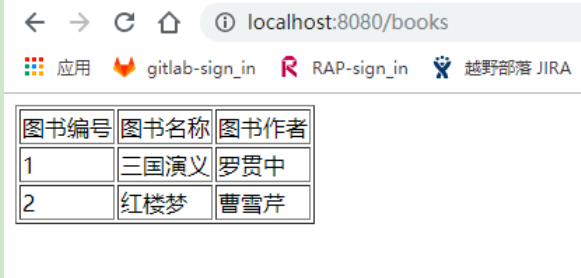
6 、运行

若有收获,就点个赞吧
0 人点赞


