1 创建springboot工程
2 pom中引入相关依赖
<dependency><groupId>com.github.penggle</groupId><artifactId>kaptcha</artifactId><version>2.3.2</version></dependency>
3 三种实现方式
3.1 第一种使用xml文件配置属性
resources下新建kaptcha.xml
<?xml version="1.0" encoding="UTF-8"?><beans xmlns="http://www.springframework.org/schema/beans"xmlns:xsi="http://www.w3.org/2001/XMLSchema-instance"xsi:schemaLocation="http://www.springframework.org/schema/beans http://www.springframework.org/schema/beans/spring-beans.xsd"><bean id="captchaProducer" class="com.google.code.kaptcha.impl.DefaultKaptcha"><property name="config"><bean class="com.google.code.kaptcha.util.Config"><constructor-arg type="java.util.Properties"><props><prop key ="kaptcha.border">yes</prop><prop key="kaptcha.border.color">105,179,90</prop><prop key="kaptcha.textproducer.font.color">blue</prop><prop key="kaptcha.image.width">100</prop><prop key="kaptcha.image.height">50</prop><prop key="kaptcha.textproducer.font.size">27</prop><prop key="kaptcha.session.key">code</prop><prop key="kaptcha.textproducer.char.length">4</prop><prop key="kaptcha.textproducer.font.names">宋体,楷体,微软雅黑</prop><prop key="kaptcha.textproducer.char.string">0123456789ABCEFGHIJKLMNOPQRSTUVWXYZ</prop><prop key="kaptcha.obscurificator.impl">com.google.code.kaptcha.impl.WaterRipple</prop><prop key="kaptcha.noise.color">black</prop><prop key="kaptcha.noise.impl">com.google.code.kaptcha.impl.DefaultNoise</prop><prop key="kaptcha.background.clear.from">185,56,213</prop><prop key="kaptcha.background.clear.to">white</prop><prop key="kaptcha.textproducer.char.space">3</prop></props></constructor-arg></bean></property></bean></beans>
启动类加入@ImportResource注解
@SpringBootApplication@ImportResource(locations={"classpath:kaptcha.xml"})public class Application {public static void main(String[] args) {SpringApplication.run(Application.class, args);}}
com.xja.controller 包中创建测试controller
/*** 生成验证码并把验证码存储到session中*/@Controllerpublic class CodeController {@Autowiredprivate Producer captchaProducer = null;@GetMapping("/kaptcha")public void getKaptchaImage(HttpServletRequest request, HttpServletResponse response) throws Exception {HttpSession session = request.getSession();response.setDateHeader("Expires", 0);response.setHeader("Cache-Control", "no-store, no-cache, must-revalidate");response.addHeader("Cache-Control", "post-check=0, pre-check=0");response.setHeader("Pragma", "no-cache");response.setContentType("image/jpeg");//生成验证码String capText = captchaProducer.createText();session.setAttribute(Constants.KAPTCHA_SESSION_KEY, capText);//向客户端写出BufferedImage bi = captchaProducer.createImage(capText);ServletOutputStream out = response.getOutputStream();ImageIO.write(bi, "jpg", out);try {out.flush();} finally {out.close();}}}
3.2 第二种使用配置bean配置属性
com.xja.config 下新建 KaptchaConfig
@Componentpublic class KaptchaConfig {@Beanpublic DefaultKaptcha getDefaultKaptcha(){com.google.code.kaptcha.impl.DefaultKaptcha defaultKaptcha = new com.google.code.kaptcha.impl.DefaultKaptcha();Properties properties = new Properties();properties.setProperty("kaptcha.border", "yes");properties.setProperty("kaptcha.border.color", "105,179,90");properties.setProperty("kaptcha.textproducer.font.color", "blue");properties.setProperty("kaptcha.image.width", "110");properties.setProperty("kaptcha.image.height", "40");properties.setProperty("kaptcha.textproducer.font.size", "30");properties.setProperty("kaptcha.session.key", "code");properties.setProperty("kaptcha.textproducer.char.length", "6");properties.setProperty("kaptcha.textproducer.font.names", "宋体,楷体,微软雅黑");Config config = new Config(properties);defaultKaptcha.setConfig(config);return defaultKaptcha;}}
3.3 第三种使用配置bean,验证码属性使用验证码属性进行配置
建议使用第三种方法 resources下新建 kaptcha.properties
##### Kaptcha Informationkaptcha.width=150kaptcha.height=42kaptcha.border=nokaptcha.textproducer.font.size=40kaptcha.textproducer.char.space=10kaptcha.textproducer.font.names=\u4EFF\u5B8B,\u5FAE\u8F6F\u96C5\u9ED1kaptcha.textproducer.char.string=1234567890kaptcha.textproducer.char.length=4kaptcha.background.clear.from=92,189,170kaptcha.background.clear.to=255,255,255
KaptchaConfig修改成从属性文件中读取
@Componentpublic class KaptchaConfig1 {private static Properties props = new Properties();@Beanpublic DefaultKaptcha defaultKaptcha() throws Exception {// 创建DefaultKaptcha对象DefaultKaptcha defaultKaptcha = new DefaultKaptcha();// 读取配置文件try {props.load(KaptchaConfig1.class.getClassLoader().getResourceAsStream("kaptcha.properties"));}catch (Exception e) {e.printStackTrace();}// 将Properties文件设到DefaultKaptcha对象中defaultKaptcha.setConfig(new Config(props));return defaultKaptcha;}}
运行后,输入http://localhost:8080/kaptcha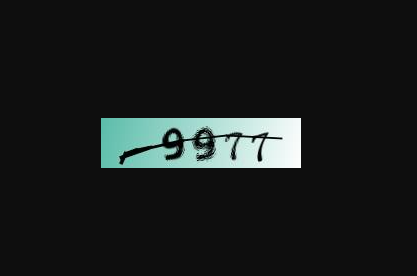
了解hutool的验证码:https://www.hutool.cn/docs/#/captcha/%E6%A6%82%E8%BF%B0?id=circlecaptcha-%e5%9c%86%e5%9c%88%e5%b9%b2%e6%89%b0%e9%aa%8c%e8%af%81%e7%a0%81

若有收获,就点个赞吧
0 人点赞


