本着不重复造轮子的开发思想,我们对Excel表格的操作都通过easyExcel进行实现
使用开源轮子实现Excel下载、导入、导出的功能。
一、项目集成
1、导包
<!-- https://mvnrepository.com/artifact/com.alibaba/easyexcel --><dependency><groupId>com.alibaba</groupId><artifactId>easyexcel</artifactId><version>2.2.7</version></dependency>
1、实现已有Excel模板下载
很多系统有数据批量导入的场景,因为在页面上批量加数据时间成本太大了,但是一般导入的时候得按照一定的格式改,所以一般好的产品会先让用户下载一个带有格式的文档,然后按照格式写好以后上传导入
根据自己的项目创建一个Excel模板,放到项目配置文件下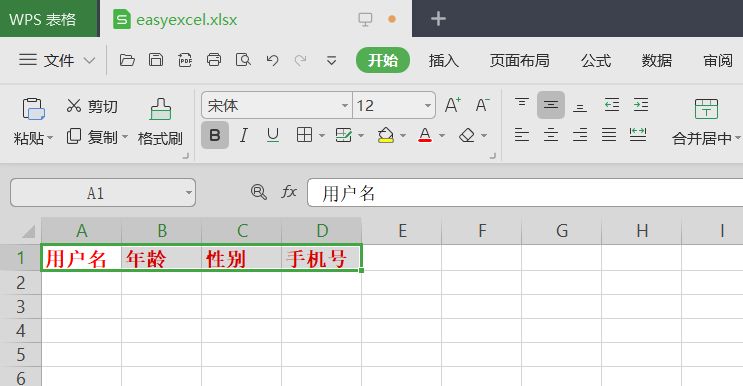
目录结构如下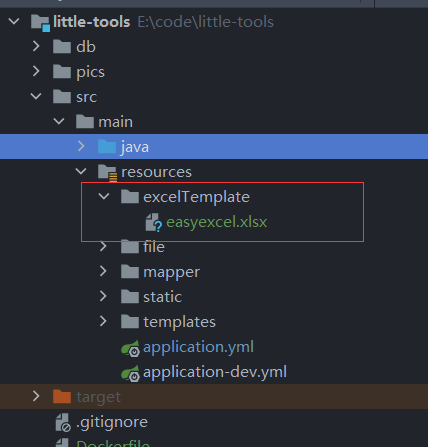
二、功能实现
1、下载
文件模板已经准备好了,实现下载模板的功能
下载功能代码也很简单,主要分为加载资源->读取资源->写入响应流
实现如下:
/*** 下载模板*/@GetMapping("/downloadTemplate")public void downloadTemplate(HttpServletResponse response) throws Exception {//获取模板文件String fileName = "template_.xlsx";String templatePath = "excelTemplate/" + fileName;ClassPathResource classPathResource = new ClassPathResource(templatePath);InputStream inputStream = classPathResource.getInputStream();ServletOutputStream servletOutputStream = null;try {response.setContentType("application/force-download");response.setHeader("Content-Disposition", "attachment;fileName=" + new String(fileName.getBytes(), StandardCharsets.UTF_8));servletOutputStream = response.getOutputStream();IoUtil.copy(inputStream, servletOutputStream);response.flushBuffer();} catch (Exception e) {log.error("下载失败,文件模板{}不存在", fileName);} finally {if (servletOutputStream != null) {servletOutputStream.close();}inputStream.close();}}
注意:
XSSF操作的是Excel2007以上的版本,对应文件的后缀名是xlsx
Workbook workbook = new XSSFWorkbook(inputStream)
HSSF操作的是Excel2003以前的版本,对应的文件后缀名是xls
Workbook workbook = new HSSFWorkbook(inputStream)
2、导入
将数据导出到文档这种场景可以说是最常见的了,那么怎么使用easyExcel快速实现呢,我们同样还是以上面的模板为例
定义模型映射对象
@Data@AllArgsConstructor@NoArgsConstructorpublic class UserExcelModel implements Serializable {private static final long serialVersionUID = 2723059827514336242L;@ExcelProperty(value = "用户名", index = 0)private String name;@ExcelProperty(value = "年龄", index = 1)private Integer age;@ExcelProperty(value = "性别", index = 2)private String sex;@ExcelProperty(value = "手机号", index = 3)private String mobile;}
注意模型映射对象一定要有默认的无参构造函数
导入数据的主要流程如下:定义列标题->创建sheet->自定义字体和风格->构造数据->写入数据->写入到浏览器响应流
代码实现如下:
/*** 读取数据** @param file 文件名称* @return list*/@PostMapping("/readExcel")public List<UserExcelModel> readExcel(@RequestParam("file") MultipartFile file) {List<UserExcelModel> list = new ArrayList<>();try {list = EasyExcel.read(file.getInputStream(), UserExcelModel.class, new ModelExcelListener()).sheet().doReadSync();} catch (IOException e) {e.printStackTrace();}return list;}
读取监听
@Slf4jpublic class ModelExcelListener extends AnalysisEventListener {private final List<Object> dataList = new ArrayList<>();/*** 通过 AnalysisContext 对象可以获取到当前sheet,当前行等数据信息** @param data 数据* @param context 表格对象*/@Overridepublic void invoke(Object data, AnalysisContext context) {//数据存储到list,供批量处理,或后续自己业务逻辑处理。log.info("读取到数据{}", data);dataList.add(data);//根据业务自行处理,可以写入数据库等等}/*** 数据解析完成回调** @param context 表格对象*/@Overridepublic void doAfterAllAnalysed(AnalysisContext context) {log.info("所有数据解析完成");}}
3、导出
/*** 导出数据,尽量导出成低版本*/@GetMapping("/exportData")public void exportData(HttpServletResponse response) throws Exception {//生成工作簿XSSFWorkbook workbook = new XSSFWorkbook();//定义列标题,尽量遵从实体类的indexString[] columnNames = {"用户名", "年龄", "性别", "手机号"};//定义工作表Sheet sheet = workbook.createSheet();//定义标题样式Font titleFont = workbook.createFont();titleFont.setFontName("宋体");titleFont.setBold(true);titleFont.setColor(IndexedColors.BLACK.index);//设置单元格样式XSSFCellStyle titleStyle = workbook.createCellStyle();titleStyle.setAlignment(HorizontalAlignment.CENTER);titleStyle.setVerticalAlignment(VerticalAlignment.CENTER);titleStyle.setFillPattern(FillPatternType.SOLID_FOREGROUND);titleStyle.setFillForegroundColor(IndexedColors.YELLOW.index);titleStyle.setFont(titleFont);//定义行Row titleRow = sheet.createRow(0);//设置列for (int i = 0; i < columnNames.length; i++) {Cell cell = titleRow.createCell(i);cell.setCellValue(columnNames[i]);cell.setCellStyle(titleStyle);}//模拟构造数据List<UserExcelModel> dataList = new ArrayList<>();dataList.add(new UserExcelModel("张三", 12, "男", "13867098765"));dataList.add(new UserExcelModel("张三1", 12, "男", "13867098765"));dataList.add(new UserExcelModel("张三2", 12, "男", "13867098765"));dataList.add(new UserExcelModel("张三3", 12, "男", "13867098765"));//创建数据行并写入值for (UserExcelModel userExcelModel : dataList) {int lastRowNum = sheet.getLastRowNum();Row dataRow = sheet.createRow(lastRowNum + 1);// 此处注意index的顺序一定要严格按照模板文件的格式dataRow.createCell(0).setCellValue(userExcelModel.getName());dataRow.createCell(1).setCellValue(userExcelModel.getAge());dataRow.createCell(2).setCellValue(userExcelModel.getSex());dataRow.createCell(3).setCellValue(userExcelModel.getMobile());}response.setContentType("application/vnd.ms-excel");response.setHeader("content-Disposition", "attachment;filename=" + URLEncoder.encode("easyexcel.xls", "utf-8"));response.setHeader("Access-Control-Expose-Headers", "content-Disposition");OutputStream outputStream = response.getOutputStream();workbook.write(outputStream);outputStream.flush();outputStream.close();}
附录:

若有收获,就点个赞吧
0 人点赞


