什么是 Array-Like Objects
顾名思义, 就是 类数组的对象。类数组对象具有数组的属性length,但是没有 数组 的一些方法, 比如 push。如下
const arrayLike = {0: "1",1: "2",length: 2}
比如 arguments 就是一个 Array-Like Objects。
function sum() {console.log(arguments)}sum( 1, 2, 3 )
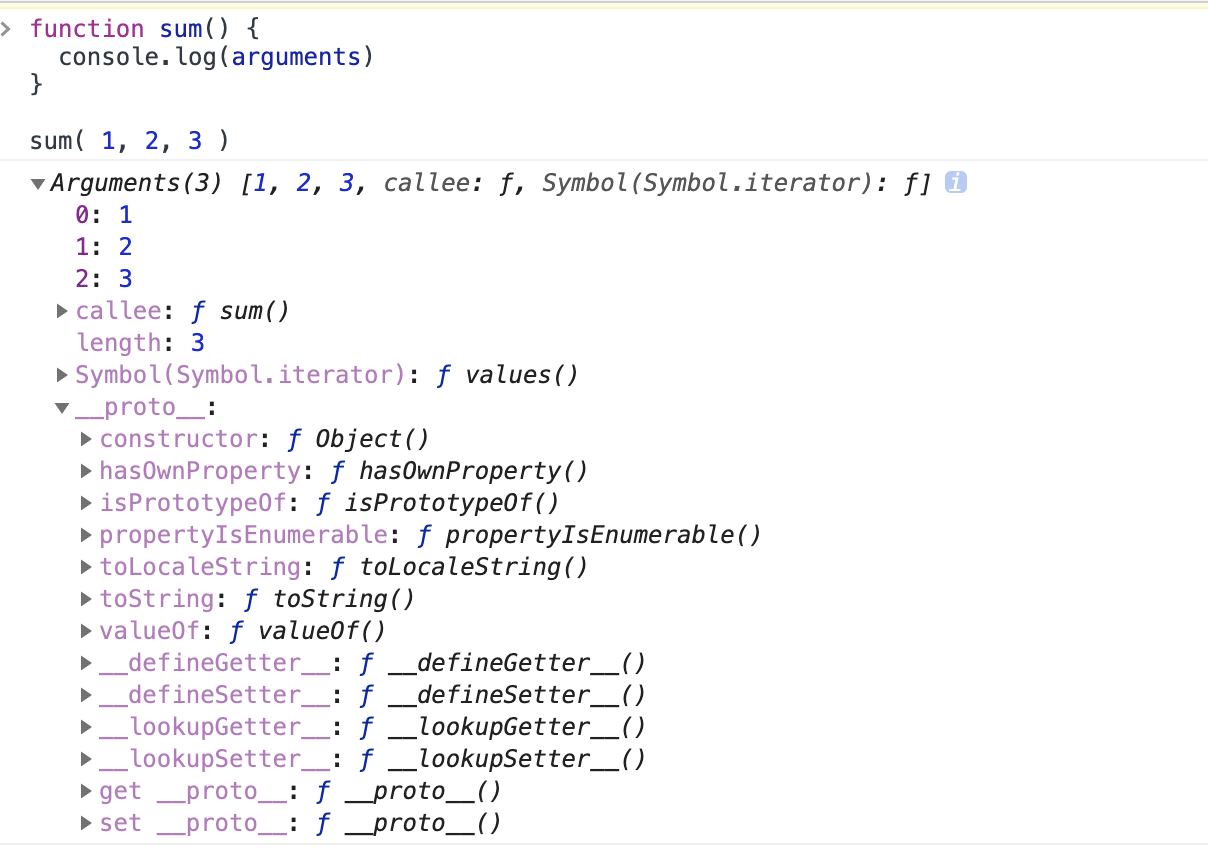
看起来是一个数组,但我们可以看见上面截图中的 arguments 的隐式原型 arguments. proto 中的方法和数组的方法确实不一样的。
我们来看看一个正常的数组的隐式原型是啥样的。
截图只展示了一部分,但是我们可以看见有明显的不同,所以说 arguments是一个 类数组对象 Array-Like Objects。
此时我们对 arguments 这个类数组对象进行 push 等数组的操作是会报错的。
那么我们怎么将 array-like 转换成 array 呢?
Array-Like 转 Array
方法一: 遍历迭代
因为 Array-Like Objects 是有长度的,所以我们可以对其进行遍历, 将其每一个元素塞进新的数组
function sum() {let arr = []for(let i = 0; i < arguments.length; i++) {arr.push(arguments[i])}arguments = arrarguments.push(4) // 此时的 argument 已经是数组了,可以进行数组的 push 操作console.log(arguments) // [ 1, 2, 3, 4 ]}sum( 1, 2, 3 )
方法二: 使用 Array.prototype.slice.call()
function sum() {arguments = Array.prototype.slice.call(arguments);// arguments = [].slice.call(arguments);arguments.push(4) // 此时的 argument 已经是数组了,可以进行数组的 push 操作console.log(arguments) // [ 1, 2, 3, 4 ]}sum( 1, 2, 3 )
同理,使用 Array.prototype.slice.apply()、Array.prototype.slice.bind() 也是一样的。
方法三: Array.from()
function sum() {arguments = Array.from(arguments);arguments.push(4); // 此时的 argument 已经是数组了,可以进行数组的 push 操作console.log(arguments); // [ 1, 2, 3, 4 ]}sum( 1, 2, 3 )
es6 解构也能实现,更简洁优雅
function sum() {arguments = [ ...arguments];arguments.push(4); // 此时的 arguments 已经是数组了,可以进行数组的 push 操作console.log(arguments); // [ 1, 2, 3, 4 ]}sum( 1, 2, 3 )

若有收获,就点个赞吧
0 人点赞


