一、Mybatis plus
意义:
为简化而生
- 无侵入:只做增强不做改变,引入它不会对现有工程产生影响,如丝般顺滑
- 损耗小:启动即会自动注入基本 CURD,性能基本无损耗,直接面向对象操作
- 强大的 CRUD 操作:内置通用 Mapper、通用 Service,仅仅通过少量配置即可实现单表大部分 CRUD 操作,更有强大的条件构造器,满足各类使用需求
- 支持 Lambda 形式调用:通过 Lambda 表达式,方便的编写各类查询条件,无需再担心字段写错
- 支持主键自动生成:支持多达 4 种主键策略(内含分布式唯一 ID 生成器 - Sequence),可自由配置,完美解决主键问题
- 支持 ActiveRecord 模式:支持 ActiveRecord 形式调用,实体类只需继承 Model 类即可进行强大的 CRUD 操作
- 支持自定义全局通用操作:支持全局通用方法注入( Write once, use anywhere )
- 内置代码生成器:采用代码或者 Maven 插件可快速生成 Mapper 、 Model 、 Service 、 Controller 层代码,支持模板引擎,更有超多自定义配置等您来使用
- 内置分页插件:基于 MyBatis 物理分页,开发者无需关心具体操作,配置好插件之后,写分页等同于普通 List 查询
- 分页插件支持多种数据库:支持 MySQL、MariaDB、Oracle、DB2、H2、HSQL、SQLite、Postgre、SQLServer 等多种数据库
- 内置性能分析插件:可输出 SQL 语句以及其执行时间,建议开发测试时启用该功能,能快速揪出慢查询
- 内置全局拦截插件:提供全表 delete 、 update 操作智能分析阻断,也可自定义拦截规则,预防误操作
DROP TABLE IF EXISTS user;
CREATE TABLE user
(
id BIGINT(20) NOT NULL COMMENT ‘主键ID’,
name VARCHAR(30) NULL DEFAULT NULL COMMENT ‘姓名’,
age INT(11) NULL DEFAULT NULL COMMENT ‘年龄’,
email VARCHAR(50) NULL DEFAULT NULL COMMENT ‘邮箱’,
PRIMARY KEY (id)
);支持数据库
任何能使用 MyBatis 进行 CRUD, 并且支持标准 SQL 的数据库,具体支持情况如下,如果不在下列表查看分页部分教程 PR 您的支持。
- MySQL,Oracle,DB2,H2,HSQL,SQLite,PostgreSQL,SQLServer,Phoenix,Gauss ,ClickHouse,Sybase,OceanBase,Firebird,Cubrid,Goldilocks,csiidb
- 达梦数据库,虚谷数据库,人大金仓数据库,南大通用(华库)数据库,南大通用数据库,神通数据库,瀚高数据库
1、快速入门
构建一个SpringBoot工程
- 导入依赖
注意!!!mybatis和plus版本只能引入其中一个版本,不然会失效
<dependency><groupId>mysql</groupId><artifactId>mysql-connector-java</artifactId></dependency><dependency><groupId>com.baomidou</groupId><artifactId>mybatis-plus-boot-starter</artifactId><version>3.0.5</version></dependency>
- 创建表 ```sql DROP TABLE IF EXISTS user;
CREATE TABLE user ( id BIGINT(20) NOT NULL COMMENT ‘主键ID’, name VARCHAR(30) NULL DEFAULT NULL COMMENT ‘姓名’, age INT(11) NULL DEFAULT NULL COMMENT ‘年龄’, email VARCHAR(50) NULL DEFAULT NULL COMMENT ‘邮箱’, PRIMARY KEY (id) );
DELETE FROM user;
INSERT INTO user (id, name, age, email) VALUES (1, ‘Jone’, 18, ‘test1@baomidou.com’), (2, ‘Jack’, 20, ‘test2@baomidou.com’), (3, ‘Tom’, 28, ‘test3@baomidou.com’), (4, ‘Sandy’, 21, ‘test4@baomidou.com’), (5, ‘Billie’, 24, ‘test5@baomidou.com’);
3. 编写实体类以及实体类Mapper接口```java//继承BaseMapper plus中的接口// 处理哪一个实体类就所使用该实体类的泛型@Repository//代表持久层@Mapperpublic interface UserMapper extends BaseMapper<User> {//此时所有的CRUD全部完成}
此时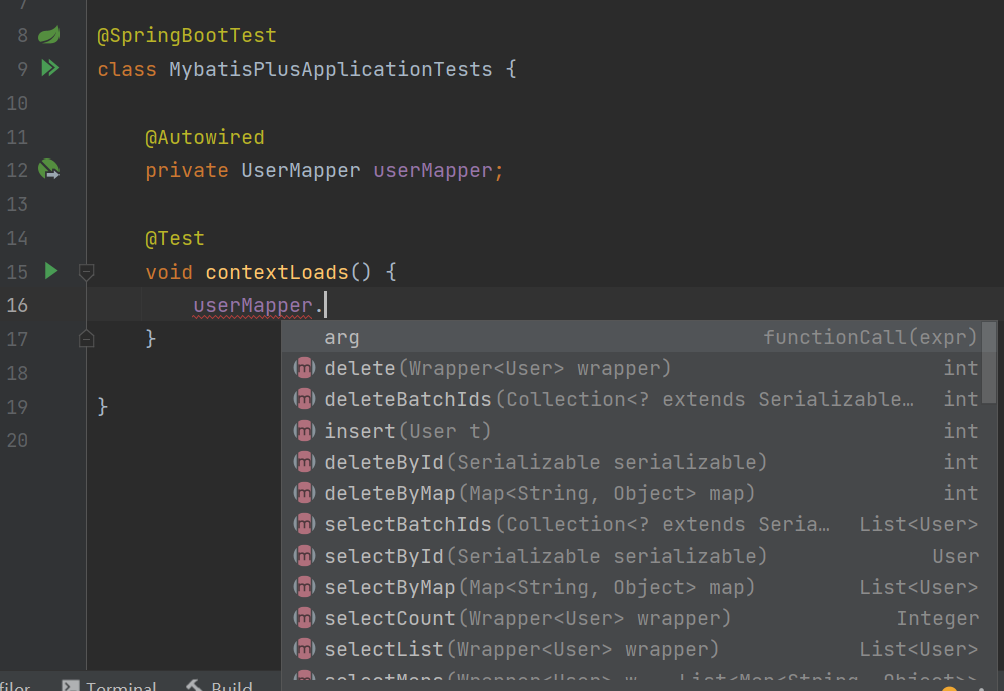
这些方法都来自于父类BaseMapper,当然我们自己也可以编写方法查询
- 编写测试方法
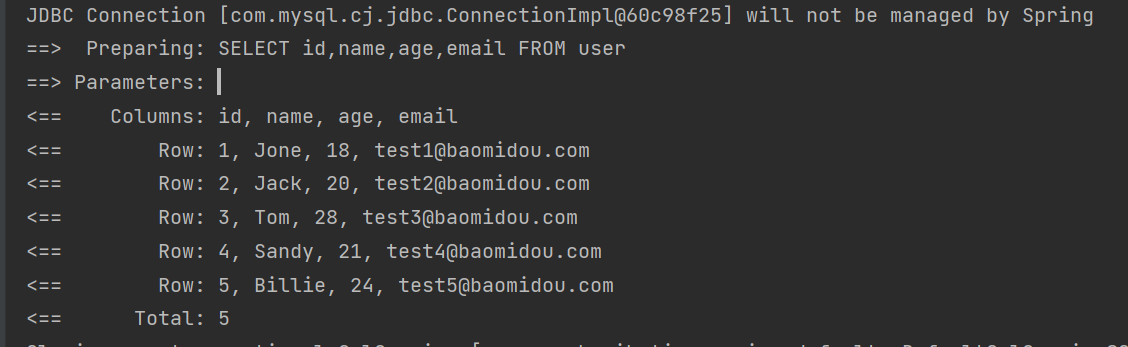
@Slf4j@SpringBootTestclass MybatisPlusApplicationTests {@Autowiredprivate UserMapper userMapper;@Testvoid contextLoads() {//Wrapper<T> 是一个条件构造器 查询所有没有条件,填写nullList<User> users = userMapper.selectList(null);log.info("所有用户是{}",users);}}
# 打印日志mybatis-plus:configuration:log-impl: org.apache.ibatis.logging.stdout.StdOutImpl
2、CRUD
主键生成策略
snowflake雪花算法 (推特)
【https://www.cnblogs.com/haoxinyue/p/5208136.html】
snowflake是Twitter开源的分布式ID生成算法,结果是一个long型的ID。其核心思想是:使用41bit作为毫秒数,10bit作为机器的ID(5个bit是数据中心,5个bit的机器ID),12bit作为毫秒内的流水号(意味着每个节点在每毫秒可以产生 4096 个 ID),最后还有一个符号位,永远是0。具体实现的代码可以参看https://github.com/twitter/snowflake。雪花算法支持的TPS可以达到419万左右(2^22*1000)。
@TableId
标注在实体类作为主键的属性上
相应的type配置
- @TableId(type=IdType.NONE) 自增
- 数据库主键字段必须是自增的
其余的
public enum IdType {AUTO(0),//数据库ID自增NONE(1),//未设置主键自增INPUT(2),//手动输入ASSIGN_ID(3),//ASSIGN_UUID(4);//全局唯一ID
更新操作
@Testvoid Update(){User user = new User(1471747870506700801L,"23232柱",23,"101001");int insert = userMapper.updateById(user);System.out.println(insert);}
内置动态SQL
自动填充
创建时间、修改时间!这些操作都是一遍自动化完成的,不希望手动更新 阿里巴巴开发手册: 所有数据库表: gmt_create,gmt_modified几乎所有的表都要配置上!而且自动化
方式一(不建议)
数据库级别
create table user(id bigint not null comment '主键ID'primary key,name varchar(30) null comment '姓名',age int null comment '年龄',email varchar(50) null comment '邮箱',# 时间单位 默认为当前时间戳gmt_create datetime default current_timestamp,gmt_modified datetime default current_timestamp);
更改实体类
public class User {@TableId(type = IdType.NONE)private Long id;private String name;private Integer age;private String email;private Date gmtCreate;private Date gmtModified;}
方式二
代码级别
//插入时间更新 @TableField(fill = FieldFill.INSERT) private Date gmtCreate; //更改时间更新 @TableField(fill = FieldFill.UPDATE) private Date gmtModified;
3. 获取填充```java@Component//注册到SpringBoot中public class MyMetaObjectHandler implements MetaObjectHandler {@Override//插入数据时填充字段public void insertFill(MetaObject metaObject) {log.info("start insert fill ....");// 参数一 字段名 二、字段值 三、要给哪个数据处理this.setFieldValByName("gmtCreate",new Date(),metaObject);this.setFieldValByName("gmtModified",new Date(),metaObject);}@Override//更改数据时填充字段public void updateFill(MetaObject metaObject) {log.info("start update fill ....");this.setFieldValByName("gmtModified",new Date(),metaObject);}}

乐观锁
对乐观锁和悲观锁的文章https://www.jianshu.com/p/d2ac26ca6525
乐观锁: 不会认为出什么问题,干什么都不会先上锁!出了问题就更新值测试 悲观锁:悲观,认为干什么都会出问题,无论干什么,都会先上锁再操作
alter table user add version int default 1;
线程A和线程B并发 同时更改一条数据,线程A访问之后将version数值+1,之后线程B发现version数值匹配不上,就放弃更改以此保障线程的安全
同时实体类同步
//这个注解代表乐观锁@Versionprivate Integer version;
添加拦截器
// Spring Boot 方式@Configuration@MapperScan("按需修改")public class MybatisPlusConfig {/*** 旧版*/@Beanpublic OptimisticLockerInterceptor optimisticLockerInterceptor() {return new OptimisticLockerInterceptor();}/*** 新版*/@Beanpublic MybatisPlusInterceptor mybatisPlusInterceptor() {MybatisPlusInterceptor mybatisPlusInterceptor = new MybatisPlusInterceptor();mybatisPlusInterceptor.addInnerInterceptor(new OptimisticLockerInnerInterceptor());return mybatisPlusInterceptor;}}

分页查询
1.配置组件
@MapperScan("mybatisplus.mapper")@Configuration//配置组件@EnableTransactionManagement//开启事务,默认开启public class MybatisPlusVersion {//@Bean//返回乐观锁拦截器组件@Beanpublic MybatisPlusInterceptor mybatisPlusInterceptor() {MybatisPlusInterceptor interceptor = new MybatisPlusInterceptor();interceptor.addInnerInterceptor(new OptimisticLockerInnerInterceptor());return interceptor;}/*** 新的分页插件,一缓和二缓遵循mybatis的规则,需要设置 MybatisConfiguration#useDeprecatedExecutor = false 避免缓存出现问题(该属性会在旧插件移除后一同移除)*/@Beanpublic MybatisPlusInterceptor mybatisPlusInterceptorPage() {MybatisPlusInterceptor interceptor = new MybatisPlusInterceptor();interceptor.addInnerInterceptor(new PaginationInnerInterceptor(DbType.H2));return interceptor;}}
- 查询
@Testvoid pag(){//获取页Page<User> objectPage = new Page<>(2,3);Page<User> userPage = userMapper.selectPage(objectPage, null);userPage.getRecords().forEach(System.out::println);}

逻辑删除
物理删除:从数据库中直接移除 逻辑删除:在数据库中没有移除,通过程序中的变量让他失效 delede=0=>delete=1
管理员可以查看被删除的记录,防止数据丢失,类似于回收站
添加一个字段delete
alter table user add luo_ji int default 0;
配置文件
mybatis-plus:global-config:db-config:logic-delete-field: flag # 全局逻辑删除的实体字段名(since 3.3.0,配置后可以忽略不配置步骤2)logic-delete-value: 1 # 逻辑已删除值(默认为 1)logic-not-delete-value: 0 # 逻辑未删除值(默认为 0)
注解:
@TableLogicprivate Integer luoJi;
执行删除语句


执行SQL分析插件
新版官方已经移除,参见官方文档
条件查询器 Warpper
支持混合SQL查询
QueryWrapper<User> userQueryWrapper = new QueryWrapper<>();userQueryWrapper.inSql("id","select id from user where id < 3");userMapper.selectList(userQueryWrapper).forEach(System.out::println);

代码生成器
新版
- 导入依赖
全局配置方案<dependency><groupId>com.baomidou</groupId><artifactId>mybatis-plus-generator</artifactId><version>3.5.1</version></dependency>
https://baomidou.com/pages/981406/#%E5%85%A8%E5%B1%80%E9%85%8D%E7%BD%AE-globalconfig

若有收获,就点个赞吧
0 人点赞


