- Data Governance, Data Stewardship, Planing & Data Quality
- Data Quality Factors
- Roles and Responsibility
- Planing
- Anti-Patterns example
- Next Steps
- Great Resources
- Bulk API and Lock Contention
- Data Modeling
- Spotlight On: Data Privacy
- Master Data Management
- What is Master Data Management?
- Why is MDM important?
- Why do we need MDM?
- CRM Challenges
- Examples of Data Quality Issues
- MDM Implementation Styles
- Registry
- MDM Example - Centralised
- System of Record/Single Source of Truth
- Data Consolidation
- Canonical Modeling Techniques
- Canonical Data Model
- Data Matching
- Data Survivorship (数据存活率)
- Data Survivorship Strategy
- Data Survivorship Examples
- Leveraging external reference data
- Hierarchy Management Benefits
- Hierarchy Management in MDM
- Capturing and Maintaining Metadata
Data Governance, Data Stewardship, Planing & Data Quality
Data Governance
Topics
- What is being collected?
- How is it beling kept secure?
- Who can create / update / manage the data?
- What quality rules and standards need to be met?
- How available and usable the data is (are)?
Processes for managing collecting data flows
Data Governance Solutions / Features
Integration
Design interfaces to collect quality data
Transformation - when importing, ensures your csv file has been set up correctly
Profiles and Permission Sets
Control the fields people can access
Control CRED access to objects
De-Duplication
Matching rules
- De-Duplication rules
- Data.com
- AppExchange tools
- DemandTools is amazing (and they offer certification!)
Lighting page - duplicate indicators
To Produce Great Quality Data
Validation rules
- Defualts
- Actions with pre-defined field values
- Field settings - unique / required
- Page layouts and record type
- Validation rules
- Automation!
- Data.com
Data Stewardship
Topics
- Monitoring data collection
- Maintaining standards
- Responding to questions about data
Resolving conflicting data problem
Stewardship Tools
To be a good steward, you could use
Data Quality scoring
- Data Quality dashboards
- Some good AppExchange analysers (e.g. Field Trip)
- Chatter
- Clinics
- Good old-fashioned conversations
Data Types
Master Data
Data Quality Factors
Factors Affecting Data Quality
- Age
- Completeness
- Accuracy
- Consistency
- Duplication
- Usage
Data Follows a Linear Process
Records are generated -> For a reason -> For someone to use -> To produce reports -> May be handed over to other systems -> May eventually be archived
Roles and Responsibility
Data Stewards
- End users in Sales, Support, Marketing etc who create the data
- Admins, champions and Ops people who work with users to maintain the standards of the data
Admins and architects who monitor the flow of data and resolve/escalate issues
Data Governance Committee
Resolves escalated problems
- Defines governance metrics
Manages integrity and quality of data
Data Governance Council
People who set policies and provide strategic direction
Steering Committee
Business sponsors who champion policies and strategies
Oversees the success of the data governance office
Data Governance Office
Works with the business to build & implement governance solutions
- Administers and reports on data governance activities
Planing
Planning your strategy
Assess the current state
- Who’s using it and how / why?
- Which data is being used?
- What’s the quality like?
- How is it being created or changed?
What does the business actually need?
Develop your plan
Define data
- Define your quality standards
- Define roles and owners
- Align on security and permissions
Devise ways to monitor and control quality
Implement your plan
Mobilise people!
- Star the project
- Build the functionality (sandbox)
- Perform any data fixes (sandbox)
- Rinse and repeat in Production
- Build and monitor dashboards, use Chatter to drive good behaviour
- Establish regular committees and meetings to inspect and adapt the strategies
Anti-Patterns example
Good Post to Study!
Next Steps
- Encourage your business to hold a workshop to define data governance polices
- Or attand one!
- Try implementing data qulity scoring
- Create dashboards and list views to help people spot dirty data
Great Resources
占位
Bulk API and Lock Contention
Agenda
- Introduction to the Bulk API
- How does the Bulk API work?
- Bulk API modes (serial/parallel)
- When would you use the Bulk API?
- Concepts of parallel processing
- What’s lock contention?
- How can we avoid lock contention?
- Quiz time
Welcome to the world of Large Data Volumes
- Working with upwards 10 million rows of data?
- Need enterprise level data migration?
- Need scalable batch data processing?
- Need an efficient way to process all this data?
- AND more…
Introducing Bulk API
- Programmatic option from Salesforce to load data into an org at speed
- Optimised for loading and deleting large data volumes
- Based on REST principles
- Lets you query, insert, update, upsert and delete records in batches
- Runs in Serial and Parallel mode
- Asynochronous processing
How does it work?
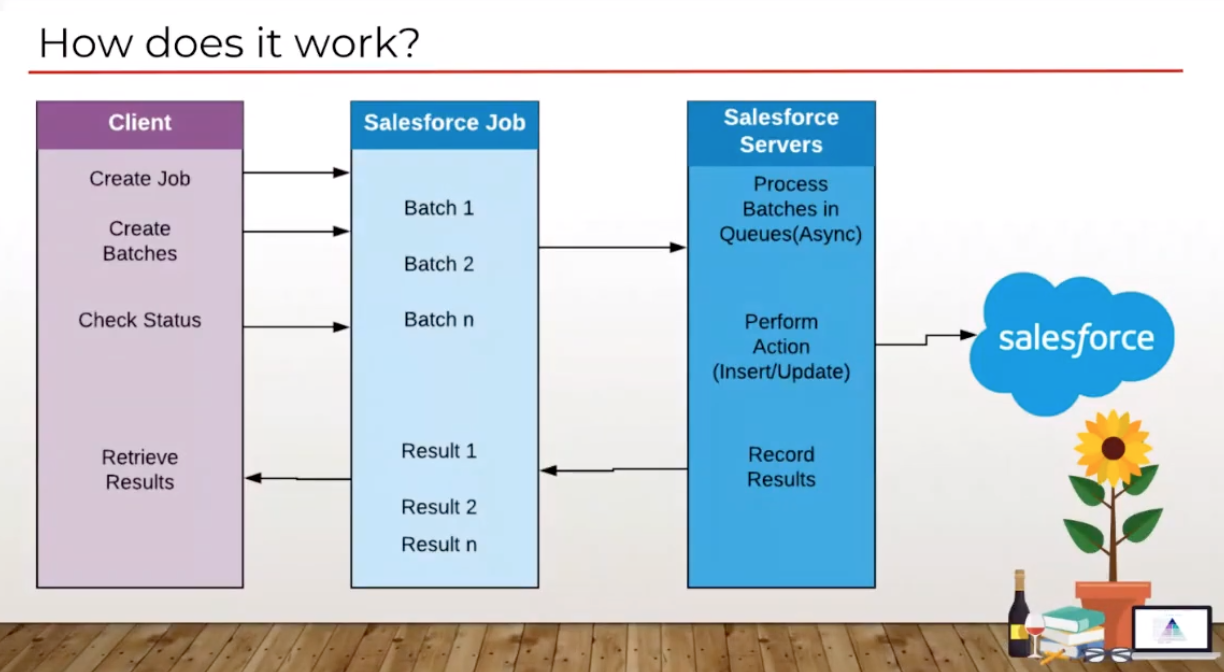
you can monitor the job by navigating to “Bulk Data Load Jobs”
Serial and Parallel Modes
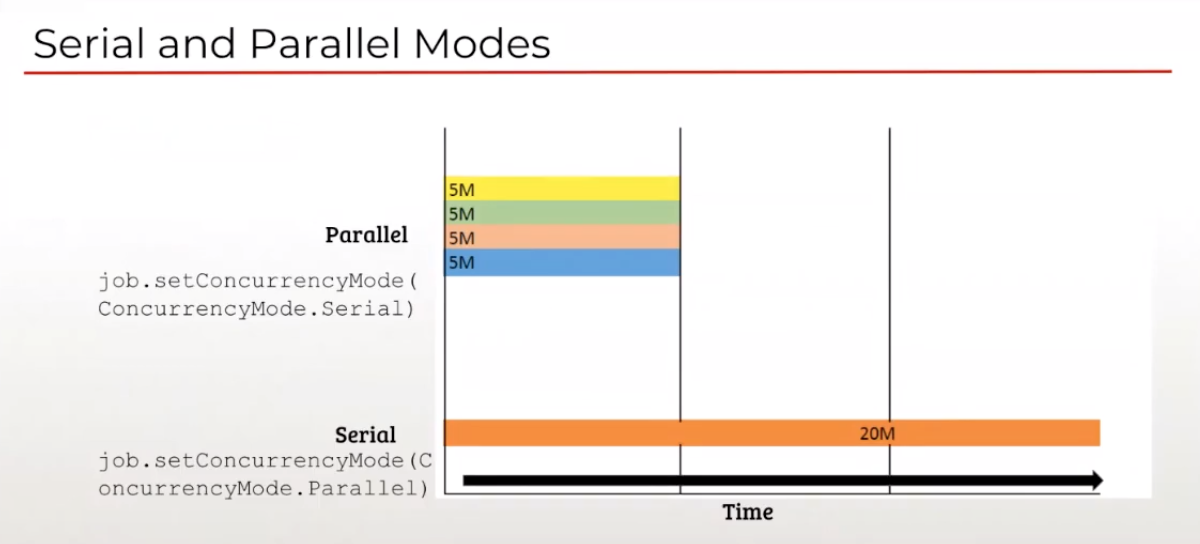
Concepts
Degree of parallelism (平行度)
An integration job that inserts 100,000 records in 5min. Your batch size is 10,000 records, so you have 10 total batches. For simplicity’s sake, say that it takes Salesforce 1min to process each batch. 10min of work was completed in 5min.
The overall degree of parallelism for the Bulk API job is 2.
degree of parallelism = amount of work completed (as a duration) / actual amount of time it took to complete that work.
For Serial loads limited to 1.
For parallel loads as much as server allows - the idea is to maximise
Throughput (吞吐量)
Records processed per second - Measure of performance
Parallel Processing
- Can increase throughput if done right
- Can produce unexpected degree of parallelism if not architected well
- Locks can significantly impact parallel processing by
- Wasted processing time
- Causing failures
- Reduced throughput
What is lock contention?
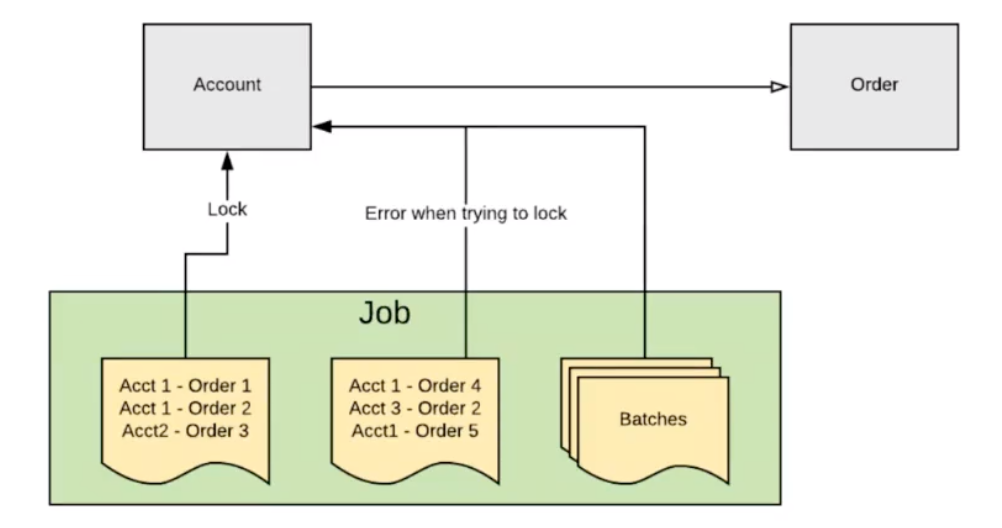
What causes a lock contention?
- Master detail relationship
- Certain types of lookup relationship
- Roll-up Summary fields
- Triggers
- Workflows
- Group Memberships
- Overlapping runs (重叠运行)
Strategies for resolving lock contention
- Do not lock lookup records - Change lookup type config
- Uncheck “Don’t allow deletion of the lookup record that’s part of a lookup relationship”
- Order records to be loaded by parent record ID
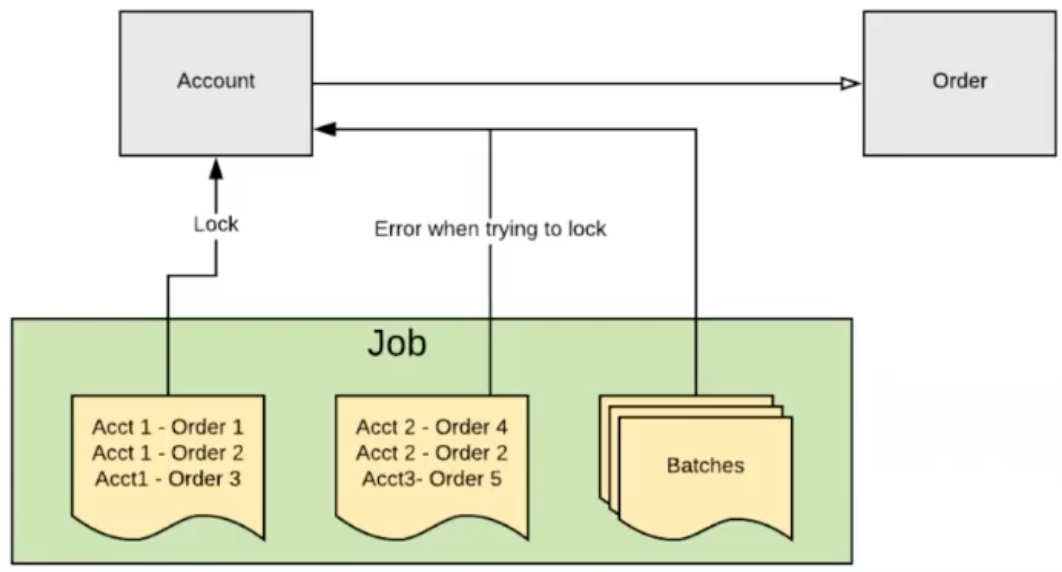
- Controlled feeds, chunking data into more jobs less batches?
- Avoid low controlled feed loads if possible
- Reduce number of Jobs and increase number of batches
- Keep at least 20 batches in the queue to optimise usage of worker threads
- Disable Validation Rules, Triggers, Workflows while loading
- Lookout for rollup summary field, use summary reporting if possible
- Defer sharing calculation for mass group membership changes
Data Modeling
Agenda
目录2
内容2
Spotlight On: Data Privacy
目录1
内容1
目录2
内容2
Master Data Management
What is Master Data Management?
Master Data
- Includes product, customer, supplier, location or asset infomation
- Doesn’t include transactional data
- Often referred to as a golden record of information
Core or critical data of your organisation
Master Data Management
Method used to define and manage critical/core data
- Manages data sharing between different business systems and platforms
Why is MDM important?
- Helps to provide a trusted CRM environment
- Consolidates and provides the best available information that is reliable for single source of truth for all records, allowing for a single view of your data
- Improves overall data quality of the CRM by eliminating duplicates and ensuring relevant information is always available inside the system
- Provides correct data for reporting and analytics without the need to access individual systems, or use cumbersome VLOOKUPS to match multiple data source
Why do we need MDM?
Data Quality
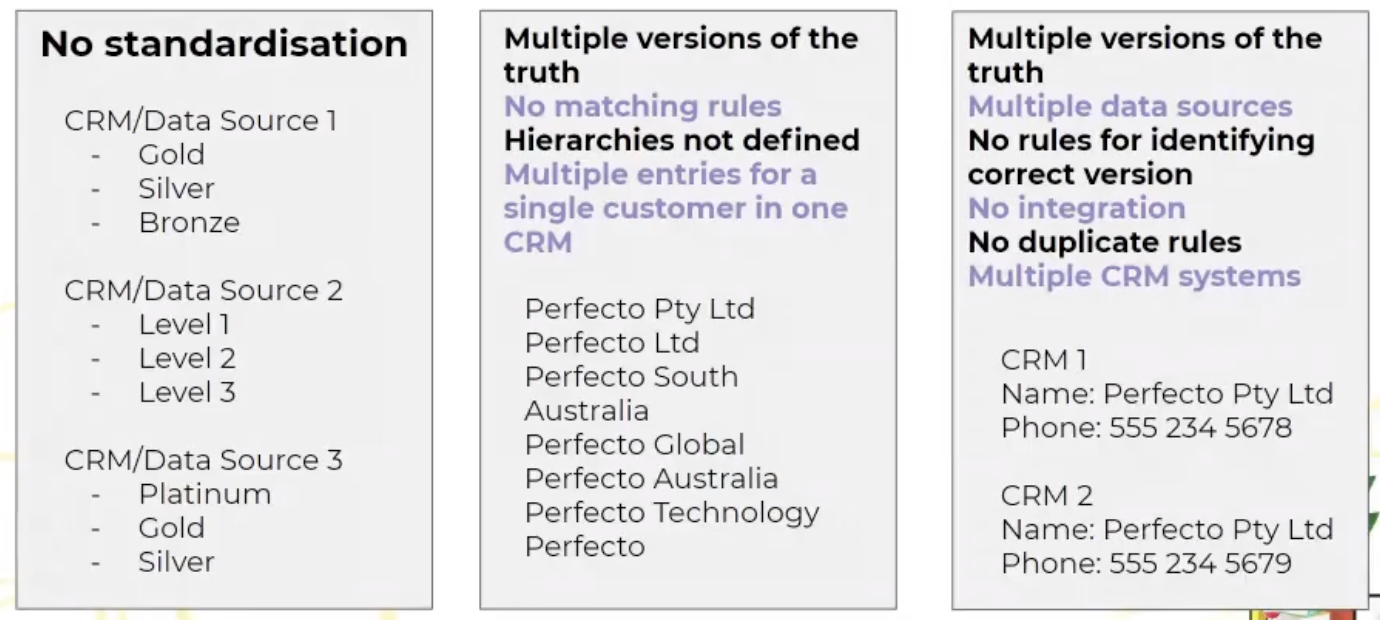
- Multiple version of truth
- Multiple systems and sources of data
- Duplicate data
- No standardisation across systems
-
Data Governance
No rules for determining data source
- No rules for identifying correct data version
- No rules for matching and merging
- No standardization rules
- Hierarchies not defined
CRM Challenges
- Multiple CRMs due to mergers or acquisitions
- Multiple entries for a single customer in one CRM
- No integration or syncing
- No standardisation for data or process flows
- Incomplete or missing data
- No standardised hierarchies for reporting
Examples of Data Quality Issues
MDM Implementation Styles
Registry
- Creates master data without changing any data in the source systems
- Uses data cleansing and match tools
- Doesn’t utilise a central hub
- Data in the source systems are not modified
Maily used for analytical purposes
Consolidation (整合)
Data is gathered from various source systems and consolidated in a central hub
- Source systems continue to use their own master data for transaction processes
- Data is cleaned, matched an integrated in the central hub but source systems are not modified
Provides a trusted source of data for reporting and analytics
Coexistence
Creates a consolidated set of master data in the central hub
- Data is updated in the source system and then synced with the bub
Offers a balance between systems level management and centralised governance
Transaction/Centralised
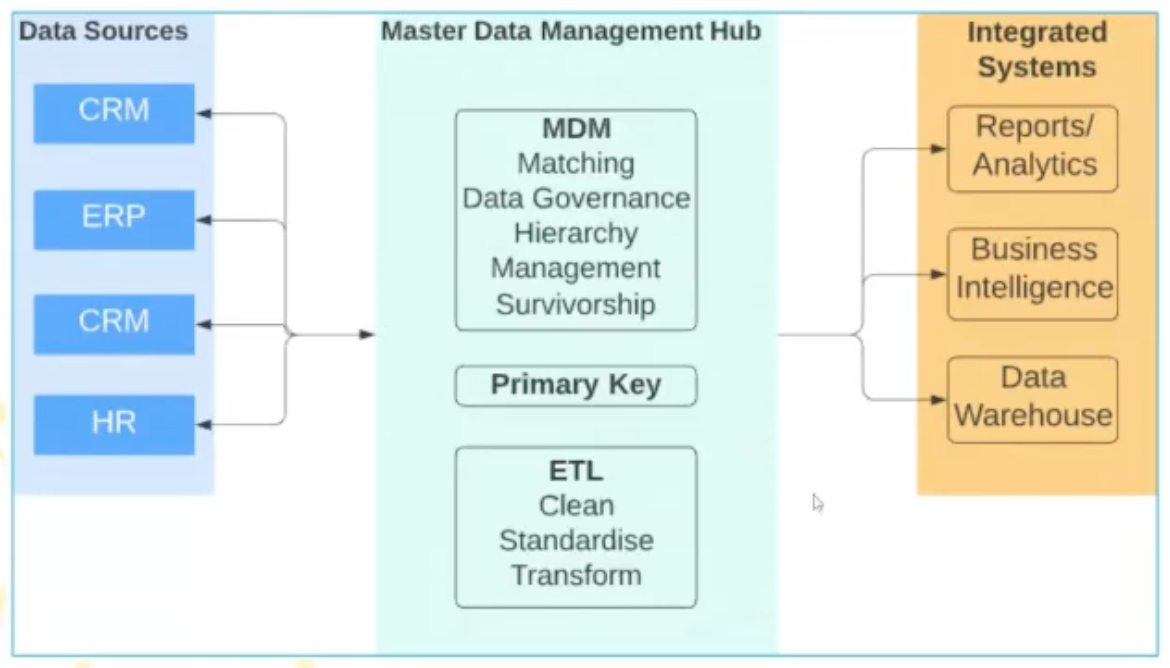
Management and updating of data is carried out in a central hub
- The central hub is the single provider of all master data
- Enhanced data is published back to the source systems using a primary key
- Full centralisation
MDM Example - Centralised
System of Record/Single Source of Truth
- System of record/single source of truth is the system that a specific piece of data (field/object) is correct
- System of record could contain different information or data (field)
- To obtain the SOR, review data flows and processes with business users
- System of record could then be updated in the SIngle Source of Truth
- Single Source of Truth could be a data warehouse repository, an application, CRM (e.g. Salesforce)
- A data strategy would need to be set by stakeholders to define the system of record, and matching between systems (Primary Key)
Data Consolidation
- Collating master data from multiple sources and integrating into a central hub (source of truth)
- Can be consolidated in the central hub
- Using matching using your primary key, survivorship, master data rules (winning system when value differ)
- Can then be updated to the source systems, or retained in the central hub, depending on MDM requirements
Once data is matched, duplicate rules must be defined to determine any duplicate data. Once duplicate rules are defined, data survivorship then comes into play.
Canonical Modeling Techniques
- Form of enterprise application architecture that aims to prevent entities and relationships in the simplest form
- Creates a common definition of your data unit to contain and translate types of data
- Modelling techniques include the use any technology used including enterprise service bus, business performance/process management platforms, service-oriented architecture, etc
- Need to create a data model which supersedes all others and a translator module or layout which all existing systems exchange data with other systems
- Replaces standard point-to-point models
Canonical Data Model

Data Matching
Deterministic
- Looks for an exact match between records or pieces of data
- Good when data has been cleansed and standardised prior to matching
-
Probabilistic (可能性/概率)
Uses a statistical approach to determin if two records represent the same piece of information (e.g. ‘Like’)
- Assigns a percentage indicating probability of match
- A wider set of data elements is used
- Weights are used to calculate match scores
- Thresholds (阀值) are used to determin a match, non-match or possible match
- Has a higher accuracy in matching records
Data Survivorship (数据存活率)
Data survivorship is the process of identifying and resolving duplicate customer records.
Each field is validated and weighted/scored to decide on survivorship.
If two fields have the same weight/score, precedence (优先级) will determine which value should survive.
A data survivorship strategy needs to be defined by reviewing with stakeholders and users to understand data flows.
A MDM system will take those set values and define which record or field we keep as our survivor and where it is updated.
Data Survivorship Strategy
A data survicorship strategy needs to be defined by reviewing with stakeholders and users to understand data flows.
Survivorship validation could include:
- Structure of data, Source of data, How data is populated, Nature of the data, Nature of business rules | Most accurate | Using validation rules to check on accuracy of a field (e.g. correct format email). | | —- | —- | | Most recent | When a record or field was added, updated or verified most recently | | Most frequent | When field values are repeated across multiple systems | | Most complete | More field values are populated in a record | | Leveraging reference data | Matches against external data sources |
A MDM system will take those set rules and define which data is kept as the survivor and where it is updated.
Data Survivorship Examples
Most Frequent (Address field)

Most Accurate (Address field)

Most Recent (Address field)
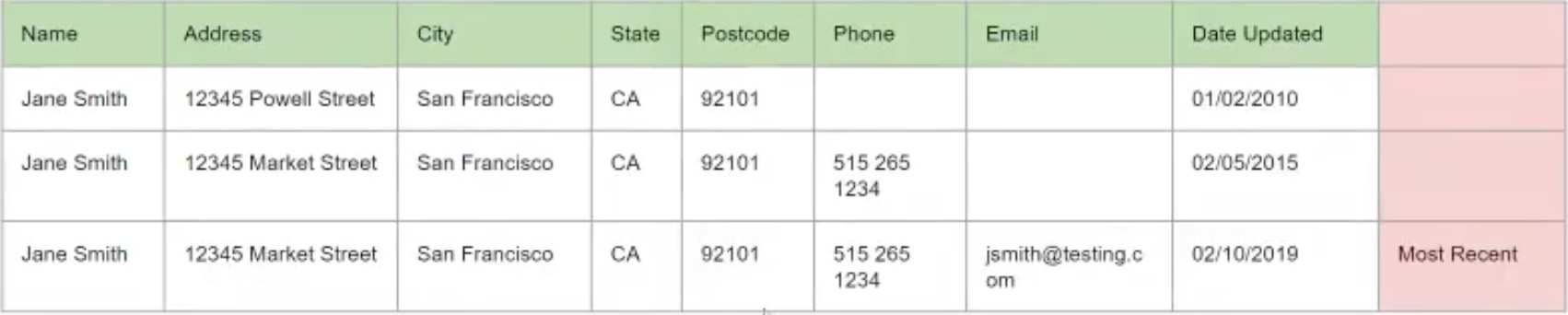
Most Complete/Most Accurate

Leveraging external reference data
- External data services could be used to match records against a trusted source (e.g. Data.com or 3rd party applications on the AppExchange)
- External data sources can also provide additional information about clients
- External data sources can provide additional functionality and process management (e.g. account software or human resource systems)
Hierarchy Management Benefits
The benefits of Hierarchy Management include:
- Clearer visibility and more structure to your data, providing a full picture of your interlinking accounts or information
- Better reporting of your data structure allows you to see all connections between your data, benefiting all areas of your business from sales to procurement
- Effective assignments and territory management allowing records to be assigned correctly and visible to thoes who need them
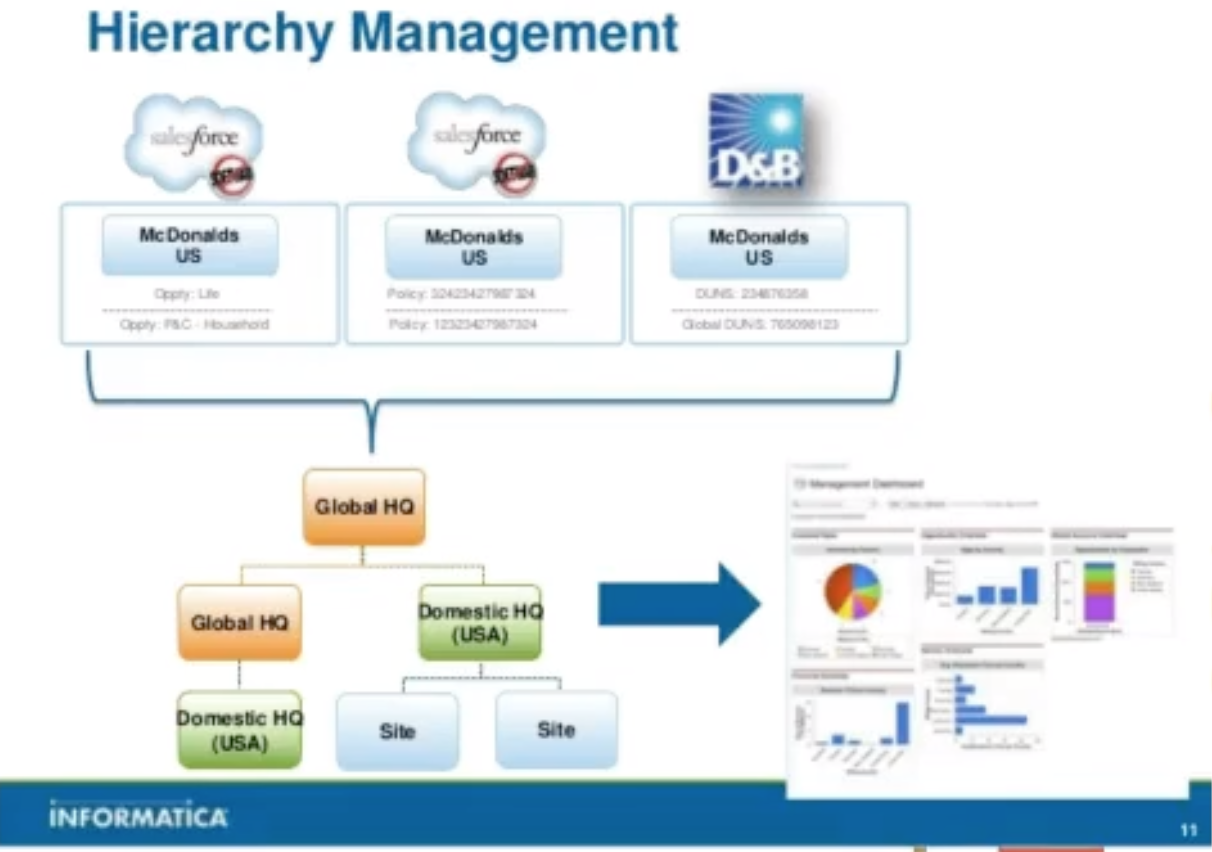
Hierarchy Management in MDM
- An MDM Hierarchy shows the relationships between records in the MDM hub
- Entities in the MDM Hierarchy can be of the same or different base objects
- Relationships must be taken into account before a hierarchy is established
- Often represented by Foreign Keys in database
- Helps to prevent duplicates
Capturing and Maintaining Metadata
Event Monitoring
| Included with Enterprise, Unlimited and Performance Editions | Login, Logout, insecure external assets 1d retention |
|---|---|
| Additional cost | URI (web clicks in Salesforce Classic), Lightning (web clicks, performance and errors including mobile app), Visualforce page loads, API calls, Apex executions, Report exports 30d retention (including Login, Logout and insecure external assets) |
| Developer Edition | Free access to all log types 1d retention |
- Can be viewed and downloaded after 24h
- Download as a CSV, using cURL or Python
- Access and query via the API/Workbench
Can be viewed in Einstein Analytics with the Event Monitoring Analytics app or by using 3rd party apps such as Splunk Add-on for Salesforce, FairWarning or CloudLock
Setup Aduit Trail
Tracking admin modifications, deletion of fields, password changes, flow changes, permission changes, admin login as, etc
- Last 20 changes shown on screen
- Full history can be downloaded for the previous 180d
Custom Metadata Types & Custom Settings
| Custom Metadata Types | Custom Settings | | —- | —- | | Supports picklist fields, long text areas, page layout, validation rules | Does not support these | | Supports relationship fields | Does not support relationship fields | | Can be referenced in a formula field | Can be referenced in a formula field | | Mapping - different configurations can be mapped | Provides List and Hierarchy only | | Master data - custom metadata types can be created as master data and then deployed in packages | Can be used as master data in one org,
would need to be replicated manually in another org | | Can be deployed in packages | Cannot be deployed in packages |
Field Audit Trail
| Field History Tracking (standard functionality) | Field Audit Trail (additional functionality) |
|---|---|
| Track and display up to 20 fields on each supported object for 18 months | Allows tracking of up to 60 fields per supported object for up to 10 years |
| Data is retained up until 24 months and can be accessed via Data Loader | A data retention policy needs to be set for each object to specify the number of months to store data in product, when to archive before it’s deleted |
| After 24 months, data is deleted | Archiving is done using a big object |
| Supported objects are custom objects, Accounts, Cases, Contacts, Leads, Opportunities, Articles, Assets, Campaigns, Contracts, Contract line items, Entitlements, Orders, Order Products, Products, Price Book Entries, Service Contracts, Solutions |

若有收获,就点个赞吧
0 人点赞


