QVBoxLayout Class Reference
[QtGui module]
该QVBoxLayout将类排队部件垂直。More…
继承QBoxLayout。
Methods
__init__ (self)__init__ (self, QWidget parent)
Detailed Description
该QVBoxLayout将类排队部件垂直。
这个类是用于构建垂直框布局对象。看QBoxLayout了解详情。
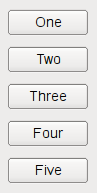
最简单的使用类是这样的:
[QWidget](qwidget.html) *window = new [QWidget](qwidget.html);[QPushButton](qpushbutton.html) *button1 = new [QPushButton](qpushbutton.html)("One");[QPushButton](qpushbutton.html) *button2 = new [QPushButton](qpushbutton.html)("Two");[QPushButton](qpushbutton.html) *button3 = new [QPushButton](qpushbutton.html)("Three");[QPushButton](qpushbutton.html) *button4 = new [QPushButton](qpushbutton.html)("Four");[QPushButton](qpushbutton.html) *button5 = new [QPushButton](qpushbutton.html)("Five");QVBoxLayout *layout = new QVBoxLayout;layout->addWidget(button1);layout->addWidget(button2);layout->addWidget(button3);layout->addWidget(button4);layout->addWidget(button5);window->setLayout(layout);window->show();
首先,我们创建我们要在布局窗口小部件。然后,我们创建了QVBoxLayout将对象并添加小工具到布局。最后,我们调用QWidget.setLayout( )到QVBoxLayout将物体安装到小部件。在这一点上,在该布局中的窗口小部件被重设父有window作为它们的父。
Method Documentation
QVBoxLayout.__init__ (self)
构造一个新的垂直框。你必须将它添加到另一个布局。
QVBoxLayout.__init__ (self, QWidget parent)
该parent的说法,如果不是没有,原因self通过Qt的,而不是PyQt的拥有。
构造一个新的顶级垂直框父parent。

若有收获,就点个赞吧
0 人点赞


