PasswordField(密码框)
JavaFX PasswordField 控件使 JavaFX 应用程序的用户能够输入密码,然后应用程序可以读取该密码。PasswordField 控件不显示输入的文本。相反,它会为每个输入的字符显示一个圆圈。JavaFX PasswordField 控件由 javafx.scene.control.PasswordField 类表示。
A JavaFX PasswordField control enables users of a JavaFX application to enter password which can then be read by the application. The PasswordField control does not show the texted entered into it. Instead it shows a circle for each character entered. The JavaFX PasswordField control is represented by the class javafx.scene.control.PasswordField.
创建 PasswordField
您可以通过创建 PasswordField 类的实例来创建 PasswordField 控件。这是一个 JavaFX PasswordField 实例化的示例:
You create a PasswordField control by creating an instance of the PasswordField class. Here is a JavaFX PasswordField instantiation example:
PasswordField passwordField = new PasswordField();
向场景图中添加 PasswordField
要使 JavaFX PasswordField 可见,必须将 PasswordField 对象添加到场景图中。这意味着将其添加到 Scene 对象,或作为附加到 Scene 对象的布局组件的子节点。
For a JavaFX PasswordField to be visible the PasswordField object must be added to the scene graph. This means adding it to a Scene object, or as child of a layout which is attached to a Scene object.
这是一个将 JavaFX PasswordField 附加到场景图的示例:
Here is an example that attaches a JavaFX PasswordField to the scene graph:
package com.jenkov.javafx.controls;import javafx.application.Application;import javafx.scene.Scene;import javafx.scene.control.PasswordField;import javafx.scene.layout.HBox;import javafx.stage.Stage;public class PasswordFieldExperiments extends Application {@Overridepublic void start(Stage primaryStage) throws Exception {primaryStage.setTitle("PasswordField Experiment 1");PasswordField passwordField = new PasswordField();HBox hbox = new HBox(passwordField);Scene scene = new Scene(hbox, 200, 100);primaryStage.setScene(scene);primaryStage.show();}public static void main(String[] args) {Application.launch(args);}}
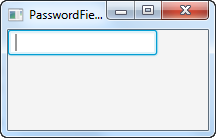
运行上述 JavaFX PasswordField 示例的结果如下所示:
The result of running the above JavaFX PasswordField example is an application that looks like this:
获取 PasswordField 的文本
您可以使用它的 getText() 方法获取输入到 PasswordField 中的文本,该方法返回一个字符串类型。这是一个完整的示例,它显示了一个 PasswordField 和一个 Button,并在单击按钮时读取输入到 PasswordField 中的文本:
You can get the text entered into a PasswordField using its getText() method which returns a String. Here is a full example that shows a PasswordField and a Button and which reads the text entered into the PasswordField when the button is clicked:
package com.jenkov.javafx.controls;import javafx.application.Application;import javafx.scene.Scene;import javafx.scene.control.Button;import javafx.scene.control.PasswordField;import javafx.scene.layout.HBox;import javafx.stage.Stage;public class PasswordFieldExperiments extends Application {@Overridepublic void start(Stage primaryStage) throws Exception {primaryStage.setTitle("PasswordField Experiment 1");PasswordField passwordField = new PasswordField();Button button = new Button("Click to get password");button.setOnAction(action -> {System.out.println(passwordField.getText());});HBox hbox = new HBox(passwordField, button);Scene scene = new Scene(hbox, 200, 100);primaryStage.setScene(scene);primaryStage.show();}public static void main(String[] args) {Application.launch(args);}}

若有收获,就点个赞吧
0 人点赞


