前言: 从事nodeJS开发多年,回想自己的node学习之路,经历了好几个node框架,一开始看文档也是模模糊糊,好多理念不理解。在研读计算机网络、计算机操作系统和浏览器书籍,知识打牢之后又读了node经典入门数据《深入浅出NodeJS》,朴灵写的,读了三遍,对node的基础思想和知识架构在脑海里慢慢成型;
从异步I/O事件到libuv的线程池到node事件处理机制,从node模块机制,到内存控制垃圾回收,再到V8引擎,再到stream(网络流,文档流)… nodejs虽然应用层上是Javascript,依赖V8引擎解析调用libuv抹平系统之间的差异,底层的内建模块都是C#语言编写,所以内置模块运行速度相比java并不逊色;而且依赖于libuv线程池+nodeJS事件运行机制,node在处理低cpu密集高异步I/O的情境下游刃有余。
但是nodeJS的缺点也很明显:
- 不适合CPU密集型应用
- 基于单进程导致多核CPU的利用率低,即使加了cluster,对qps的提高也不是线性的。
- 可靠性低
但是这并不妨碍前端的同学通过NodeJS打开后端的大门,接触更多的后端知识。
现在nodeJS的使用场景有开发工具/脚手架、BFF、SSR、反向代理等;
接下来带大家入门一个实用的git 自动创建远程repo并提交代码的工具,通过这个工具可以带你入门nodeJS,你可以学到fs模块、process模块、path模块、console模块等基础模块, 那么如何用nodeJS创建一个CLI APP(命令行工具)呢?
创建一个远程仓库需要几步?
- 首先登陆gitlab
- 创建一个新的project
- 本地,git init初始化本地仓库
- 添加.gitignore文件
- git add
- git commit -m “Initial commit”
- git remote add origin
- git push -u origin master
我们创建一个node命令行工具去简化这些步骤;
需要的知识:
- 基础的node知识
- node环境,建议node版本高于V13.2.0
Node verison 13.2.0 起开始正式支持 ES Modules 特性。
- git 程序
1. 首先我们Npm init初始化一个项目,新建一个index.js的文件存当做我们app的入口文件;文件中引入我们cli常用的npm包,如下:
#! /usr/bin/env node// 提供可执行的terminal 命令const app = require("commander");// 允许给terminal的文字加颜色const chalk = require("chalk");// terminal 清屏const clear = require("clear");// 提供大字体的文字const figlet = require("figlet");// 交互式的命令行工具,询问问题收集回答const inquirer = require("inquirer");// 使用 personal access token登录github
还有其他开发cli工具好用的npm包:
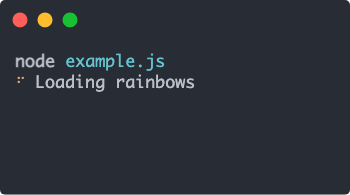
- ora 优雅的终端加载器
- shelljs 封账了child_process的模块,调用系统命令更加方便
- yargs // 处理命令行参数
2. 创建一个简单的终端命令
我们想要用户在执行node index.js init命令的时候,能执行我们定义的Init方法;我们可以用commander或yargs去创建一个init命令,解析输入的命令行,然后执行自定义的操作console.log("hello world")
#! /usr/bin/env node// 提供可执行的terminal 命令const app = require("commander");// 允许给terminal的文字加颜色const chalk = require("chalk");// terminal 清屏const clear = require("clear");// 提供大字体的文字const figlet = require("figlet");// 交互式的命令行工具,询问问题收集回答const inquirer = require("inquirer");// 使用 personal access token登录github//display app titleconsole.log(chalk.redBright(figlet.textSync("SELF MADE CLI TOOL!", { horizontalLayout: "full" })));//show welcome messageconsole.log(chalk.yellow("Welcome to the GitHub initializer tool."));app.command("init").description("Run Cli Tool!").action(async () => {//show welcome messageconsole.log("hello world");});app.parse(process.argv);//show help if no arg is passedif (!app.args.length) {app.help();}
使用chalk给文字添加红色,figlet生成大字号的文字,看下效果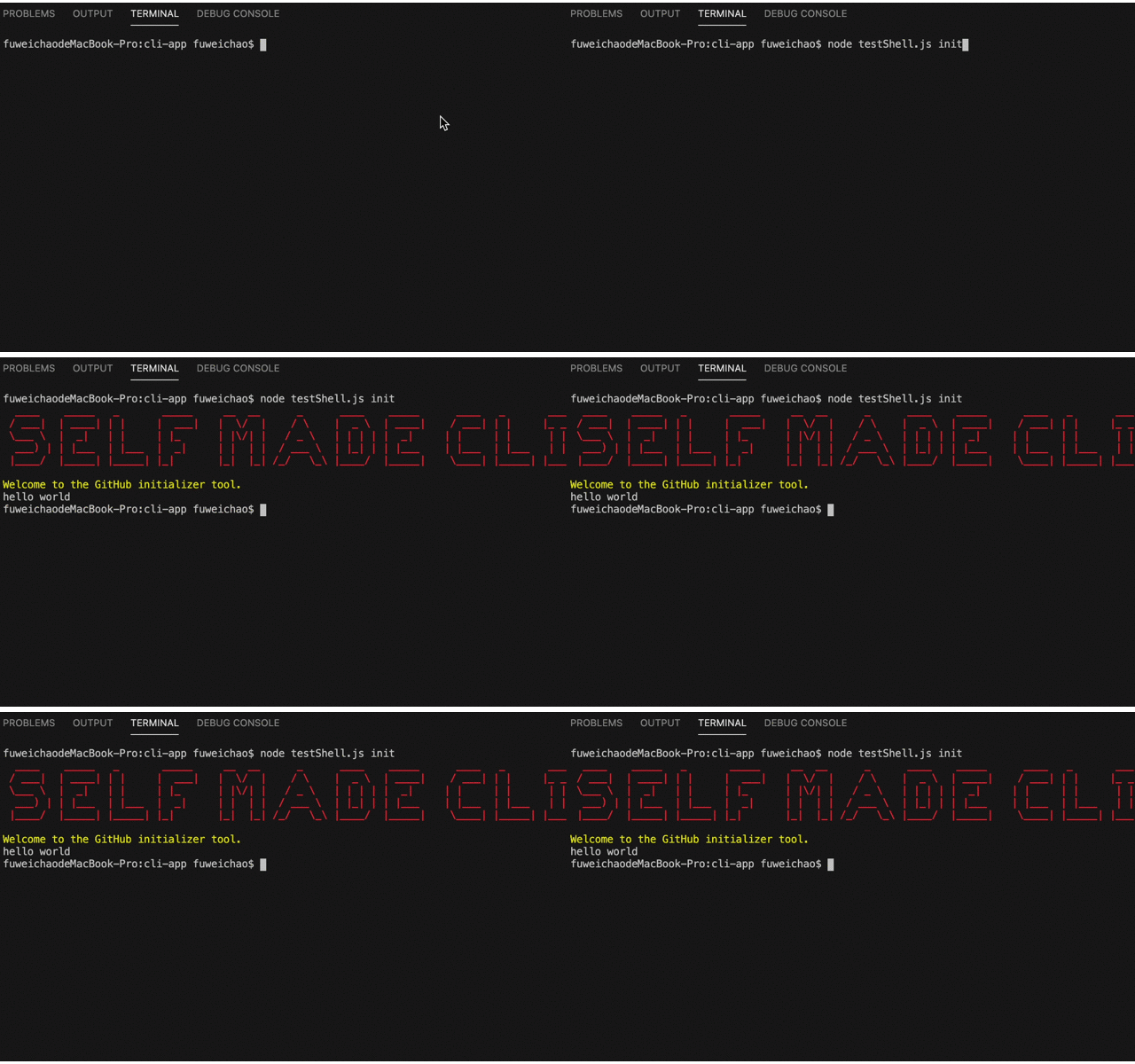
当我们创建好命令之后,就可以向用户发起询问是否自动创建一个远程仓库,使用inquirer库可以支持人机交互式的命令行询问,inquirer.prompt接收一个配置参数questions ,并返回一个promise对象:
inquirer.prompt(questions, answers) -> promise
const question = [{name: "proceed",type: "list",message:"Proceed to push this project to a Github remote repo?(Yes/No)",choices: ["Yes", "No"],default: "0",},];const answer = await inquirer.prompt(question);if (answer.proceed == "Yes") {console.log(chalk.blue("Yes,let' do it"));} else {//show exit messageconsole.log(chalk.gray("Ok, bye."));}});
现在我们实现的功能有个:
- 接受init命令,展示欢迎消息
询问用户是否创建远程仓库,yes->进入下一步,no->退出
3. git账户登录,并存储用户的登录凭证
git远程登录通过创建git lab后台创建
personal access token,用于通过API调用gitlab的接口和登录授权;
登录询问如下:const question = [{name: "token",type: "input",message: "Enter your github personal access token",validate: function (params) {if (params.length == 40) {return true;} else return "Please enter a vaild token";},},];token = (await inquirer.prompt(question)).token;
进一步优化,我们可以通过记录
personal access token并存储在本地,这样每次登录就不用都输入一次;
使用configstore库,它会接收name生成一个json文件,存储在~/.config/configstore/**.json下面;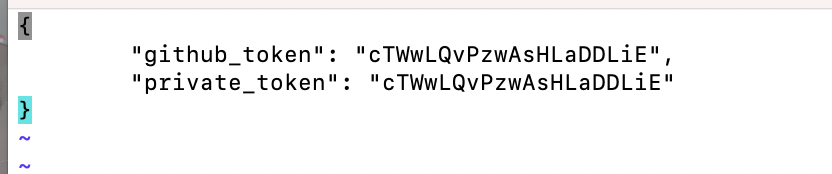 ```javascript
const inquirer = require(“inquirer”);
const packageJson = require(“./package.json”);
const chalk = require(“chalk”);
const got = require(“got”);
```javascript
const inquirer = require(“inquirer”);
const packageJson = require(“./package.json”);
const chalk = require(“chalk”);
const got = require(“got”);
async function authenticate() { const { default: Configstore } = await import(“configstore”); const config = new Configstore(packageJson.name); //1. 尝试获取token let token = config.get(“private_token”); if (!token) { const question = [ { name: “token”, type: “input”, message: “Enter your gitlab personal access token”, validate: function(params) { if (params.length == 20) { return true; } else return “Please enter a vaild token”; }, }, ]; token = (await inquirer.prompt(question)).token; } else { console.log(“Token is found in config.”); }
try { console.log(chalk.green(“Authenticating…”)); const result = await got(“https://****/api/v4/projects“, { searchParams: { private_token: token, }, responseType: “json”, }); // 2. 存储token,下次直接取出使用 config.set(“private_token”, token); console.log(chalk.green(“authenticated!!!”)); } catch (error) { console.log(chalk.redBright(“Unauthorized, please check your token”)); config.delete(“private_token”); return false; } return true; }
<a name="Tszxf"></a>### 4. 使用gitlab API创建project查阅git lab中文文档,找到创建project的API,支持许多参数,必填的有name和path(新项目的存储库名称. 如果未提供,则根据名称生成(生成的小写字母加短划线)),des和其他等选填;visiability支持三种选项[**"public", "private", "internal"**]; inquirer询问用户输入项目名称,描述,选则可见性;然后通过`got`库请求git lab服务端接口:[https://****/api/v4/projects](https://git.ddxq.mobi/api/v4/projects) ,接口需要携带token,创建成功会返回当前project的参数;```javascriptasync function newReop() {const question = [{name: "name",type: "input",message: "Enter new repo Name",default: path.basename(process.cwd()),validate: (value) => {if (value.length) {return true;} else {return "Please enter a valid input.";}},},{name: "description",type: "input",message: "Enter new repo description (optional).",default: null,},{name: "visibility",type: "list",message: "Set repo to public or private?",choices: ["public", "private", "internal"],default: "private",},];const answers = await inquirer.prompt(question);// 创建一个repoconst data = {name: answers.name,description: answers.description,visibility: answers.visibility,};const { default: Configstore } = await import("configstore");const config = new Configstore(packageJson.name);const token = config.get("private_token");if (!token) {console.log(chalk.red("please rewrite token"));return false;}try {const response = await got.post("https://****/api/v4/projects", {json: data,searchParams: {private_token: token,},responseType: "json",});return response.body;} catch (e) {if (e.response.statusCode === 401) {console.log(chalk.red(e.response.body.message || e.response.body.error));}process.exit(1);}}
5. 配置.gitignore文件
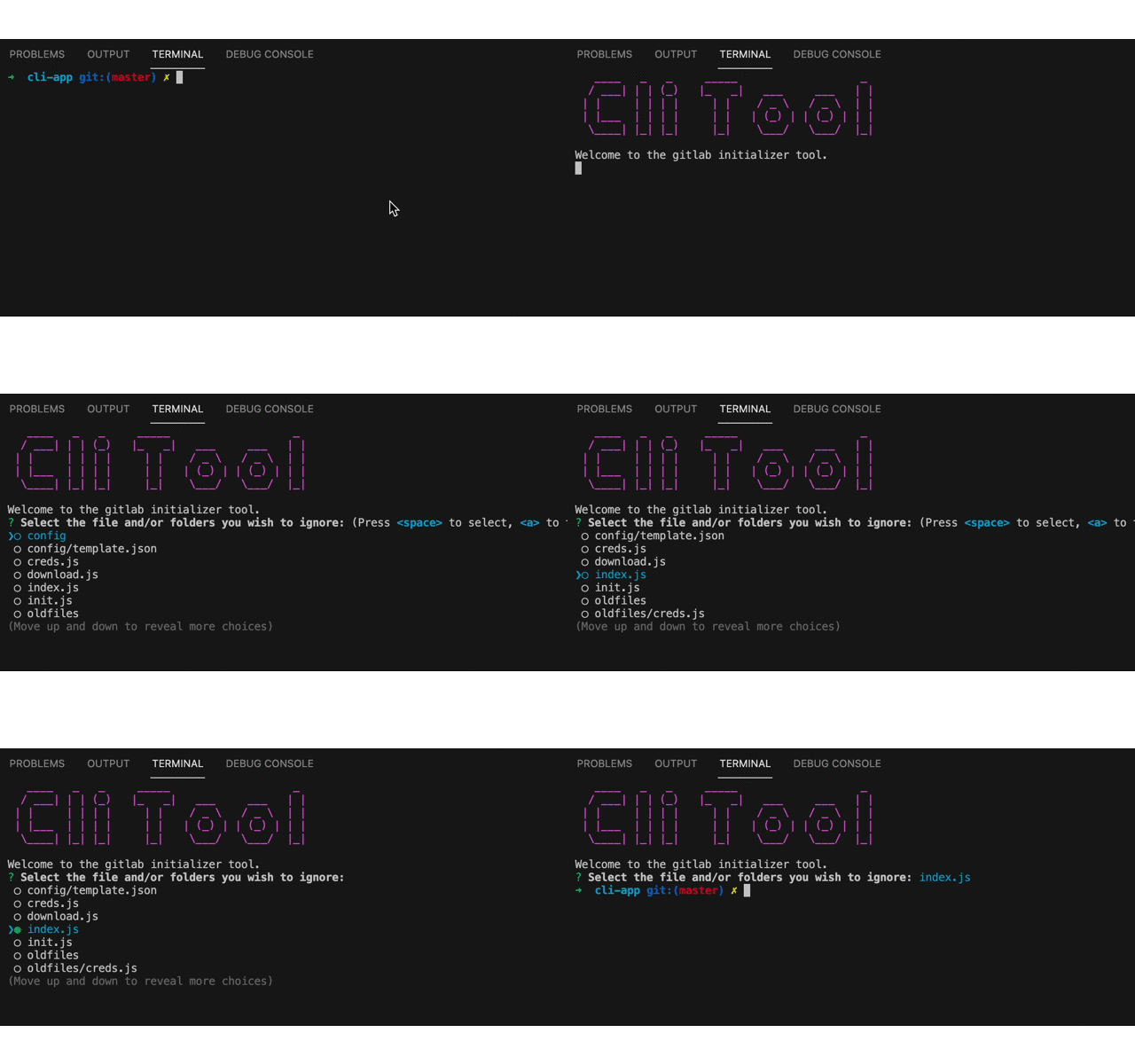
我们的工具现在实现了登录->存储token,我们可能还需要配置.gitignore文件来确定哪些文件需要提交到远程仓库;我们可以使用glob库通过全局模式匹配的方式查找文件,glob.sync同步返回查找到的结果;
async function ignoreFiles(params) {const filesToIgnore = [];const files = glob.sync("**/*", {ignore: "**/node_modules/**",});const node_modules = glob.sync("{*/node_modules/,node_modules/}");if (node_modules.length) {filesToIgnore.push(...node_modules);} else {fs.closeSync(fs.openSync(".gitignore", w));}// 创建一个问题,询问哪些文件需要忽略const question = [{name: "ignore",type: "checkbox",message: "Select the file and/or folders you wish to ignore:",choices: files,},];const answers = await inquirer.prompt(question);// 如果用户选则了某个文件或文件夹,写入.gitignoreif (answers.ignore.length) {filesToIgnore.push(...answers.ignore);fs.writeFileSync(".gitignore", filesToIgnore.join("\n"));}}
6. git 提交文件到远程
然后询问用户使用http还是ssh的方式设置remote;
const clone_method = await inquirer.prompt({name: "clone methods",type: "list",message: "which methonds do you want do clone?",choices: ["http", "ssh"],default: "http",});const url =clone_method === "http" ? urls.http_url_to_repo : urls.ssh_url_to_repo;
使用simple-git 库可以用js调用git命令,git init和addRemote的方法支持回调函数,在回调函数中配合ora库展示loading效果,展示成功、失败信息;
async function initialCommit(url) {try {function onInit(err, initResult) {if (err) {spinner.fail();console.log(chalk.red("git init error!"));return;}spinner.succeed();spinner.color = "yellow";spinner.text = `git add remote`;spinner.start();}function onRemoteAdd(err, addRemoteResult) {if (err) {spinner.fail();console.log(chalk.red("git add remote error!"));return;}spinner.succeed();}var spinner = ora("git init....").start();await git.init(onInit).add(".gitignore").add("./*").commit("initial commit").addRemote("origin", url, onRemoteAdd).push(url, "master", ["-u"]);return true;} catch (e) {console.log(e);process.exit(1);}}
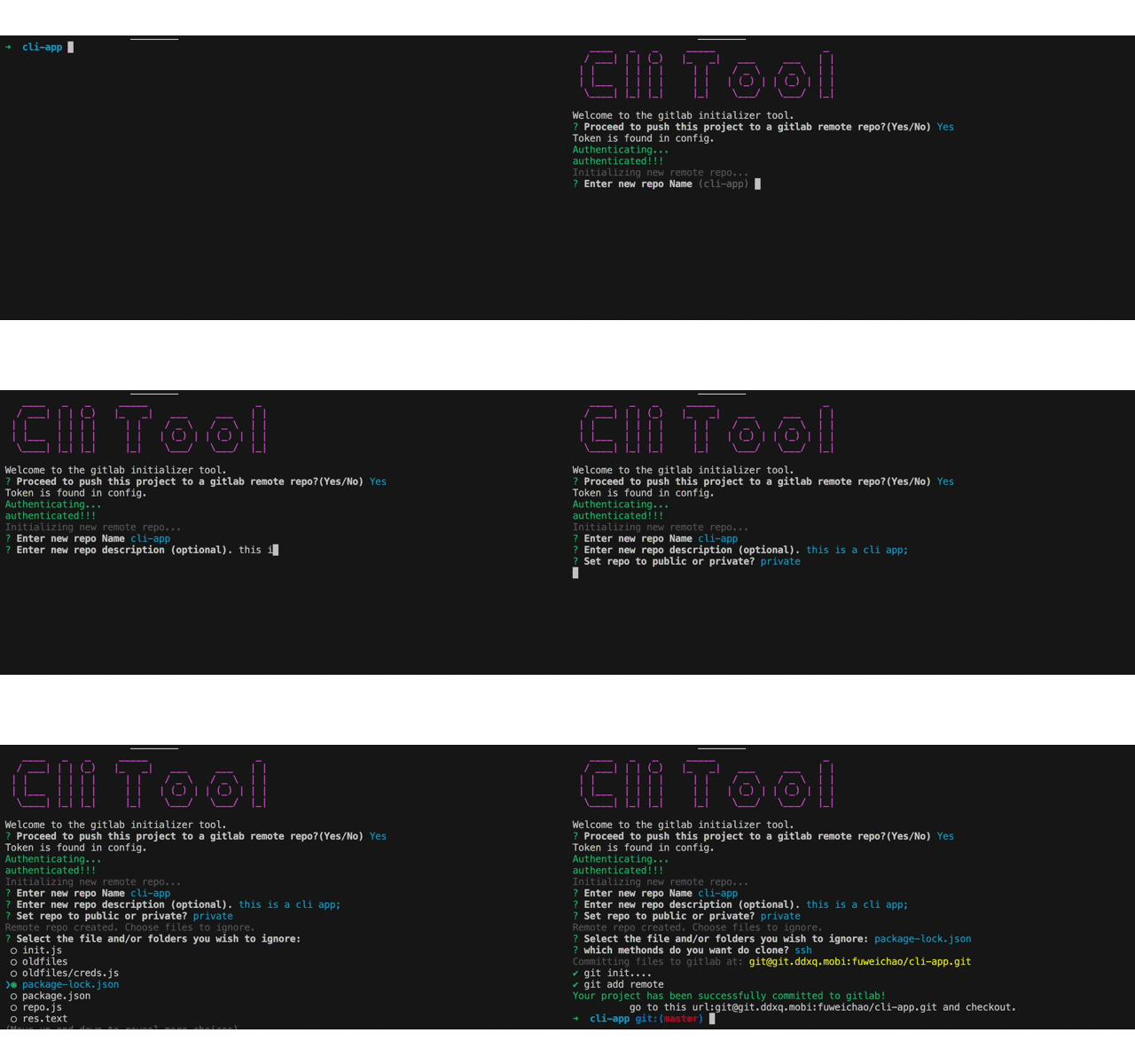
现在的效果是:
- 输入命令node index.js init (或者使用script 脚本启动文件)
- 欢迎信息,询问是否创建一个远程仓库 yes->步骤3,no->退出
- 登录,输入personal access token,如果之前输入过则从configstore文件中读取
- 输入项目名,描述,可见等参数,创建project
- 选则需要git 忽略文件或文件夹,写入.gitignore
- 使用git命令创建remote,提交代码
- 提示成功消息,done
总结一下:
我们通过练习这个工具的编写,可以掌握如何编写一个cli App,顺便也学会了如何编写,调试,打包上线一个npm库;里面有一些基础的nodejs知识,比如
- node模块
- commonJS规范
- node中如何使用esmodule
- 各种做cli可能会用到的库,比如
commonder,chalk,figlt,got,inquirer,simple-git,configstore,glob,ora等 - 常用的node基础模块
需要看源码私信我
参考资料:
- git lab中文文档[https://www.bookstack.cn/read/gitlab-doc-zh/docs-353.md#bqaa2e]
- 各种npm库…省略
- nodeJS文档 [http://nodejs.cn/api/]

若有收获,就点个赞吧
0 人点赞


