Emmmm…懒癌晚期的我…终于再次开始写blog了…
拜无穷无尽的考试 ~~ 和懒~~ 所赐…10天没有更新了!
感谢大家的催更吖!
| 程序语言 | Python | | —- | —- | | 工具/原料 | 电脑,Tkinter | | 其它 | 懒癌晚期患者,催更… 请勿温柔 |
某人:Talk is cheap,show me the code!【是这样说的吗?】
我:好叭~ code来啦!接好,小心砸你脸上!
介个是 上篇链接~:
【Python】从0到1:从头开始写打砖块小游戏)
今日份Code ):
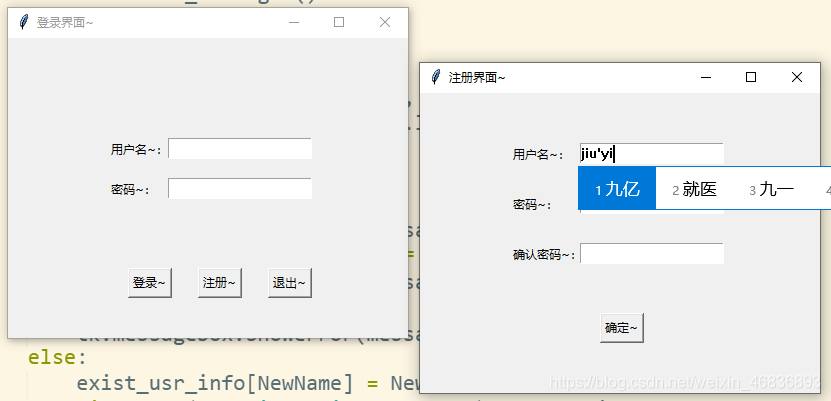
# 初始化import tkinter as tkimport tkinter.messageboximport picklewindow = tk.Tk()# 登陆界面window.title('登录界面~')window.geometry('400x300')tk.Label(window, text='用户名~:').place(x=100,y=100)tk.Label(window, text='密码~:').place(x=100, y=140)var_usr_name = tk.StringVar()enter_usr_name = tk.Entry(window, textvariable=var_usr_name)enter_usr_name.place(x=160, y=100)var_usr_pwd = tk.StringVar()enter_usr_pwd = tk.Entry(window, textvariable=var_usr_pwd, show='*')enter_usr_pwd.place(x=160, y=140)#登录def usr_log_in():#输入框内容usr_name = var_usr_name.get()usr_pwd = var_usr_pwd.get()try:with open('usr_info.pickle', 'rb') as usr_file:usrs_info=pickle.load(usr_file)except:with open('usr_info.pickle', 'wb') as usr_file:usrs_info={'admin':'admin'}pickle.dump(usrs_info, usr_file)# 判断用户输入if usr_name in usrs_info:if usr_pwd == usrs_info[usr_name]:tk.messagebox.showinfo(title='Welcome!', message='Hi~ o(* ̄▽ ̄*)ブ,登录成功啦~')else:tk.messagebox.showerror(message='emmm...账号不存在,请检查输入~ 未注册请先注册哦~')# 用户名 & 密码不能为空elif usr_name == '' or usr_pwd == '':tk.messagebox.showerror(message='用户名和密码不能为空哦~')def usr_sign_quit():window.destroy()def usr_sign_up():def signtowcg():NewName = new_name.get()NewPwd = new_pwd.get()ConfirPwd = pwd_comfirm.get()try:with open('usr_info.pickle', 'rb') as usr_file:exist_usr_info = pickle.load(usr_file)except FileNotFoundError:exist_usr_info = {}if NewName in exist_usr_info:tk.messagebox.showerror(message='用户名被别人占用啦!')elif NewName == '' and NewPwd == '':tk.messagebox.showerror(message='用户名和密码不能为空哦~')elif NewPwd != ConfirPwd:tk.messagebox.showerror(message='emmm...密码前后不一致...')else:exist_usr_info[NewName] = NewPwdwith open('usr_info.pickle', 'wb') as usr_file:pickle.dump(exist_usr_info, usr_file)tk.messagebox.showinfo(message='注册成功啦!o(* ̄▽ ̄*)ブ')window_sign_up.destroy()# 新建注册窗口window_sign_up = tk.Toplevel(window)window_sign_up.geometry('400x300')window_sign_up.title('注册界面~' )# 注册编辑框new_name = tk.StringVar()new_pwd = tk.StringVar()pwd_comfirm = tk.StringVar()tk.Label(window_sign_up, text='用户名~:').place(x=90,y=50)tk.Entry(window_sign_up, textvariable=new_name).place(x=160, y=50)tk.Label(window_sign_up, text='密码~:').place(x=90,y=100)tk.Entry(window_sign_up, textvariable=new_pwd, show='*').place(x=160, y=100)tk.Label(window_sign_up, text='确认密码~:').place(x=90, y=150)tk.Entry(window_sign_up, textvariable=pwd_comfirm, show='*').place(x=160, y=150)# 确认注册bt_confirm = tk.Button(window_sign_up, text='确定~', command=signtowcg).place(x=180,y=220)#登录 注册按钮bt_login = tk.Button(window,text='登录~',command=usr_log_in)bt_login.place(x=120,y=230)bt_signup = tk.Button(window,text='注册~',command=usr_sign_up)bt_signup.place(x=190,y=230)bt_logquit = tk.Button(window,text='退出~',command=usr_sign_quit)bt_logquit.place(x=260,y=230)window.mainloop()
并不美腻的效果图~(能力所限【捂脸】)
附 · Dream Builder 筑梦者
如果你也热爱Python,热爱开源,那么,加入我们吧!
GitHub搜索 “筑梦者” 发送加入申请即可~
若想 了解详细信息,CSDN搜索并私信 “小曹162020”,”九亿少男的兄弟” ,”Micraow Peng” 即可了解详细信息~
也可以直接在 评论区👇👇👇留下你的GitHub号哦
欢迎您的加入~

若有收获,就点个赞吧
0 人点赞


