对Draftail编辑器进行扩展
Wagtail的富文本编辑器是利用 Draftail 构建的,同时其功能可通过插件加以扩展。
插件有三种类型:
- 内联样式 — 用于对行的一部分进行格式化,比如
bold、italic、monospace - 块 — 用于表示内容的结构,比如
blockquote、ol - 实体 — 用于输入一些附加数据/元数据,比如
link(带有URL)、image(带有文件)
所有这些插件,都是在一个类似基线上创建出来的,下面就以一个最简单的示例 — 一个用于内联样式mark的定制功能 —来演示插件的创建。将下面的代码放入任意已安装应用中的wagtail_hooks.py中:
import wagtail.admin.rich_text.editors.draftail.features as draftail_featuresfrom wagtail.admin.rich_text.converters.html_to_constentstate import InlineStyleElementHandlerfrom wagtail.core import hooks# 1. 使用 register_rich_text_features 钩子@hooks.register('register_rich_text_features')def register_makr_feature(features):"""对`mark`功能进行注册,该功能使用了 Draft.js 的 `MAKR` 内联样式类型并是作为HTML的 `<mark>` 标签进行存储的"""feature_name = 'mark'type_ = 'MARK'tag = 'mark'# 2. 就Draftail如何在其工具栏中处理该功能,而对其进行配置control = {'type': type_,'label': '☆','description': 'Mark',# 下面的这个属性实际上并不需要 -- Draftail已经有着预定义MARK样式# 'style': {'textDecoration': 'line-through'},}# 3. 调用 register_editor_plugin 来对 Draftail的这些配置进行注册features.register_editor_plugin('draftail', feature_name, dratail_features.InlineStyleFeature(control))# 4. 对从数据库到编辑器及反过来的内容装换进行配置db_conversion = {'from_database_format': {tag: InlineStyleElementHandler(type_)},'to_database_format': {'style_map': {type_: tag}},}# 5. 调用 register_converter_rule,来对内容转换进行注册features.register_converter_rule('contentstate', feature_name, db_conversion)# 6. (可选的)将该功能加入到默认功能清单,以令到其在那些没有指定# 显式“功能”清单的富文本字段上可用features.default_features.append('mark')
对于所有Draftail插件,这些步骤都是一样的。以下是一些要点:
- 在各个地方,都要始终使用该功能的Draft.js类型或Wagtail的功能名称(Consistently use the feature’s Draftail.js type or Wagtail feature names where approciate)。
- 要给予到Draftail足够信息,其才知道如何产生出该功能的按钮,以及对其进行渲染的方式(有关这个问题后面会有更详尽的说明)。
- 对转换方式加以配置,以使用正确的HTML元素(因为他们是存储在数据库中的)。
有关培训选项的详细信息,可前往 Draftail文档,查看所有的细节。以下是一些有关控件的要点:
type是唯一强制要求的信息。icon、label与description一起,用于在工具栏中显示该控件- 控件的
icon可以是使用带有CSS类的某种图标字体的字符串,比如说'icon': 'fas fa-user',。也可以是使用SVG路径或SVG符号引用时的字符串数组,比如'icon': ['M100 100 H 900 V 900 H 100 Z'],。SVG的路径需要设置为一个1024x1024的视框。
新内联样式的创建
除了此前的示例外,内联样式还要取得一个style属性,用于定义何种CSS规则将应用到编辑器中的文本。一定要阅读一下 Draftail文档中有关内联样式的内容。
最后,数据库的导入/导出转换,使用了一个InlineStyleElementHandler,将给定的标签(上面示例中的mark)映射到某种Draftail类型,而逆向的映射则是使用 style_map的Draft.js的输出器配置完成的。
建立新块
块与内联样式一样简单:
from wagtail.admin.rich_text.converters.html_to_contentstate import BlockElementHandler@hooks.register('register_rich_text_features')def register_help_text_feature(features):"""对 `help-text` 功能进行注册,该功能使用了 Draft.js 的 `help-text` 块类型,并是作为 `<div class="help-text">` 标签进行存储的。"""feature_name = 'help-text'type_ = 'help-text'control = {'type': type_,'label': '?','description': '帮助文本',# 可选的,这里可以告诉Draftail在编辑器中显示这些块时,使用何种元素'element': 'div',}features.register_editor_plugin('draftail', feature_name, draftail_features.BlockFeature(control, css={'all': ['help-text.css']}))features.register_converter_rule('contentstate', feature_name, {'from_database_format': {'div.help-text': BlockElementHandler(type_)},'to_database_format': {'block_map': {type_: {'element': 'div', 'props': {'class': 'help-text'}}}},})
以下时主要的不同:
- 这里可配置一个
element,来告诉Draftail如何在编辑器中渲染这些块。 - 这里使用的是
BlockFeature来注册插件。 - 这里使用了
BlockElementHandler与block_map来设置转换。
作为可选项,也可使用CSS类Draftail-block--help-text(Draftail-block--<block type>),来定义块的样式。
就是这样了!其余的复杂性,就在于需要编写CSS来赋予编辑器中块的样式了。
新实体的创建
警告 这是一项高级特性。请再三考虑是否真的需要此特性。
实体就不再简单地是一些工具栏中的格式化按钮了。他们通常需要多得多的技能,需要与APIs进行通信或请求更多的用户输入(they(entities) usually need to be much more versatile, communicating to APIs or requesting further user input)。如此等等,
- 有极大可能需要编写大量的JavaScript代码,其中一些还需要React(you will most likely need to wirte a hefty dose of JavaScript, some of it with React)。
- API是非常底层的。因此有极大可能需要一些 Draft.js 的知识(the API is very low-level. You will most likely need some Draftail.js knowledge)。
- 对富文本中的UIs进行定制非常艰难。要做好在不同浏览器中进行测试而花大量时间的准备(custom UIs in rich text can be brittle. Be ready to spend time testing in multiple browsers)。
好消息是有了这样的底层API后,就令到第三方Wagtail插件可以在富文本功能上进行创新,带来新的体验种类。但与此同时,请考虑经由 StreamField 特性来实现UI,因为对于Django开发者来说,他有着经历了实战考验的API。
以下为创建新实体特性的一些主要要求:
- 与内联样式及块一样,要注册一个编辑器插件。
- 编辑器插件必须注册一个
source:一个负责在编辑器中创建新实体实例的、使用Draft.js API 的React组件。 - 编辑器插件还需要一个
decorator(用于内联实体)或block(用于块实体):一个负责在编辑器中显示出实体实例的React组件。 - 与内联样式与块类似,要设置好到数据库及从数据的转换。
- 该转换占了更大比重,因为实体包含了需要被序列化为HTML的数据。
关于React组件的编写,Wagtail将其自带的React、Draft.js与Draftail的依赖,作为全局变量加以暴露。有关此方面的详细信息,请参阅 对客户端组件进行扩展。而更深入的讨论,则请移步 Draftail文档 以及 Draftail导出器文档。
下面是一个详细示例,用来演示这些工具在Wagtail环境下的使用方式。为此示例目的,这里可设想某份金融报刊的新闻团队的情形。他们打算撰写有关股票市场的报道,在他们内容的任意位置对特定股票进行引用(比如在某个句子中引用 “$TSLA”),随后他们的报道中将自动完善该股票的信息(链接、数字、迷你图表等)。
编辑器工具栏将包含一个显示了可选股票清单的“股票选择器”,最后将用户的选择作为一个文本式代币进行插入。比如下面将仅随机选取一支股票:
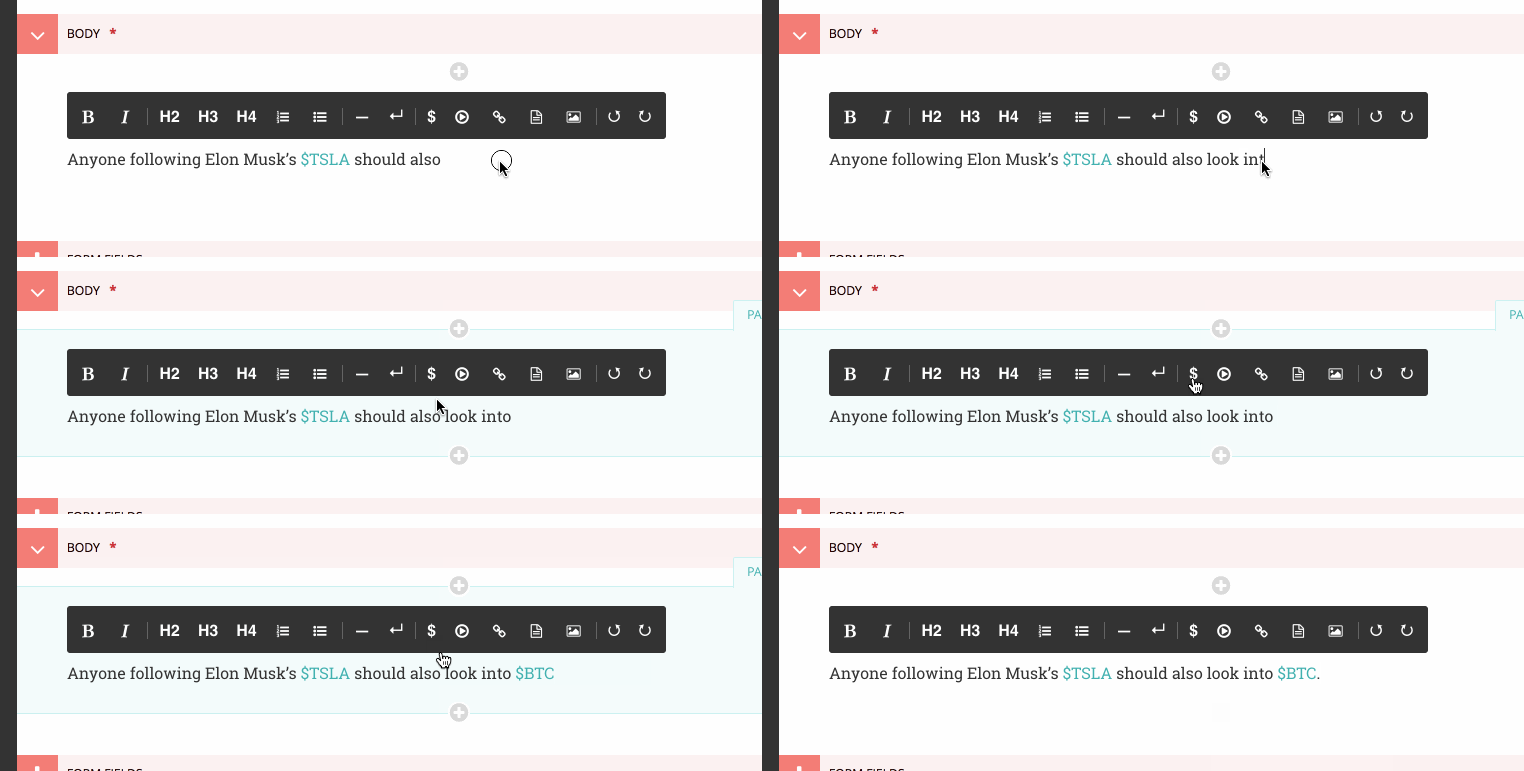
在发布时,这些代币将保存在富文本中。而在网站上该新闻报道被显示出来时,则将会把来自某个API的实时的市场数据,插入到各个代币旁边:

为了实现此特性,就要像内联样式与块那样,首先对此富文本特性进行注册:
@hooks.register('register_rich_text_features')def register_stock_feature(features):features.default_features.append('stock')"""对该 `stock` 功能进行注册,这里使用了 `STOCK` 的 Draft.js 实体类型,同时是以一个 `<span data-stokc>`的标签,作为HTML进行存储的。"""feature_name = 'stock'type_ = 'STOKC'control = {'type': type_,'lable': '$','description': '股票',}features.register_editor_plugin('draftail', feature_name, draftail_features.EntityFeature(control,js=['stock.js'],css={'all': ['stock.css']}))features.register_converter_rule('contentstate', feature_name, {# 这里请注意,数据库转换要比内联样式及块更为复杂。'from_database_format': {'span[data-stock]': StockEntityElementHandler(type_)},'to_database_format': {'entity_decorators': {type_, stock_entity_decorator}},})
EntityFeature上的 js 与 css 关键字,可用于指定额外的、于此功能出于活动状态时进行加载的JS与CSS文件。二者都是可选的。他们的值被添加到一个Media对象,有关这些对象的更多文档,在 Django表单资源文档 中可以找到。
因为实体保有数据,因此到数据库及从数据库的转换格式,就要更为复杂。这里就必须创建这两个转换处理器:
from draftjs_exporter.dom import DOMfrom wagtail.admin.rich_text.converters.html_to_contentstate import InlineEntityElementHandlerdef stock_entity_decorator(props):"""Draft.js 的 ContentState 格式到数据库的HTML。将 STOCK 实体,转换为一个 span 标签。"""return DOM.create_elment('span', {'data-stock': props['stock'],}, props['children'])class StockEntityElementHandler(InlineEntityElementHandler):"""数据库的HTML到Draft.js的ContentState格式。将该 span 标签,以正确的数据,转换为一个 STOCK 实体。"""mutability = 'IMMUTABLE'def get_attribute_data(self, attrs):"""从 "data-stock" HTML属性取得 `'stock'` 的值。"""return {'stock': attrs['data-stock'],}
注意这里他们是如何完成类似的转换,使用的却是不同的APIs. to_database_format是使用 Draft.js 的导出器 组件的 API 构建的,而 from_database_format 则使用了一个 Wagtail 的 API.
下一步就是将 JavaScript 进行添加,来定义出创建实体的方式(也就是 source)与其显示的方式(decorator)。在 stock.js 中,定义了数据源组件:
const React = window.React;const Modifier = window.DraftJS.Modifier;const EditorState = window.DraftJS.EditorState;const DEMO_STOCKS = ['AMD', 'AAPL', 'TWTR', 'TSLA', 'BTC'];// 这并非一个真正的 React 组件 -- 在实体被渲染时,尽可能快地创建出实体。class StockSorce extends React.Component {componentDidMount() {const { editorState, entityType, onComplete } = this.props;const content = editorState.getCurrentContent();const selection = editorState.getSelection();const randomStock = DEMO_STOCKS[Math.floor(Math.random() * DEMO_STOCKS.length)];// 使用 Draft.js 的API、以正确的数据来创建一个新的实体。const contentWithEntity = content.createEntity(entityType.type, 'IMMUTABLE', {stock: randomStock,});const entityKey = contentWithEntity.getLastCreatedEntityKey();// 这里还要添加一些将要激活的实体的一些文本。const text = `${randomStock}`;const newContent = Modifier.replaceText(content, selection, text, null, entityKey);const nextState = EditorState.push(editorState, newContent, 'insert-characters');onComplete(nextState);}render() {return null;}}
此源数据组件,使用了由 Draftail 所提供的数据与回调。其还使用了来自全局变量的依赖 — 请参阅 对客户端组件进行扩展。
随后创建出装饰器组件:
const Stock = (props) => {const { entityKey, contentState } = props;const data = contentState.getEntity(entityKey).getData();return React.createElement('a', {role: 'button',onMouseUp: () => {window.open(`https://finance.yahoo.com/quote/${data.stock}`);},}, props.children);};
这是一直白的 React 组件了。其并未使用 JSX, 因为这里不打算非得要为这些JavaScript代码而使用一个构建步骤。其使用了 ES6 的语法 — 在Internet Explorer 11 中无法运行,除非使用一个构建步骤转换到 ES5 的语法。
最后将这些 JS组件注册到插件:
window.draftail.registerPlugin({type: 'STOCK',source: StockSource,decorator: Stock,});
就是这样了!该项设置的所有代码,将在站点前端上最终生成以下的HTML:
<p>Anyone following Elon Mask's <span data-stock="TSLA">$TSLA</span> should also look into <span data-stock="BTC">$BTC</span>.</p>
为了最终完成该示例,这里可将一点 JavaScript 代码加入到前端,从而给这些代币装饰上一些链接与迷你图表:
[].slice.call(document.querySelectionAll('data-stock')).forEach((elt) => {const link = document.createElement('a');link.ref = `https://finance.yahoo.com/quote${elt.dataset.stock}`;link.innerHTML = `${elt.innerHTML}<svg width="50" height="20" stroke-width="2" stoke="blue" fill="rgba(0, 0, 255, .2)"><path d="M4 14.19 L 4 14.19 L 13.2 14.21 L 22.4 13.77 L 31.59 13.99 L 40.8 13.46 L 50 11.68 L 59.19 11.35 L 68.39 10.68 L 77.6 7.11 L 86.8 7.85 L 96 4" fill="none"></path><path d="M4 14.19 L 4 14.19 L 13.2 14.21 L 22.4 13.77 L 31.59 13.99 L 40.8 13.46 L 50 11.68 L 59.19 11.35 L 68.39 10.68 L 77.6 7.11 L 86.8 7.85 L 96 4 V 20 L 4 20 Z" stroke="none"></path></svg>`;elt.innerHTML = '';elt.appendChild(link);});
也可以创建定制块(请参阅单独的 Draftail 文档),但关于定制块的创建,这里不再赘述,因为在 Wagtail 中, StreamField 是创建块级别富文本的最佳方式。
Draftail小部件的集成
为更进一步对 Draftail 小部件集成到UI的方式加以定制,有着以下的 CSS与JS的额外扩展点:
- 在 JavaScript中,使用
[data-draftail-input]属性选择器,来选定带有数据的输入,并使用对封装了编辑器的元素,使用[data-draftail-editor-wrapper]属性(in JavaScript, use the[data-dratail-input]attributes selector to target the input which contains the data, and[data-dratail-editor-wrapper]for the element which wraps the editor)。 - 编辑器实例是绑定在某个必将访问的输入字段上的。使用
document.querySelector('[data-draftail-input]').draftailEditor(the editor instance is bound on the input field for imperative access. Usedocument.querySelector('[data-draftail-input]').draftailEditor)。 - 在 CSS中,使用以
Draftail-作为前缀的类(in CSS, use the classes prefixed withDraftail-)。

若有收获,就点个赞吧
0 人点赞


